
The llms.txt Plugin for WordPress That Curates, Not Just Generates
An llms.txt plugin for WordPress that only generates a file has solved the easy half of the problem. IndexMesh for WordPress's llms.txt module is built for founders and small teams without a dedicated marketing or dev team.
It gives you six guided sections, Site Identity, Core Offerings, Positioning, Key Pages, Authority, and AI Guidance, to curate exactly what your llms.txt says.
Per-page pinning and exclusion, plus a check on which version of the file is actually being served, round it out.
IndexMesh for WordPress is a free AI visibility plugin that also controls which AI crawlers reach your site and keeps your organisation and author schema accurate.
Deciding what an AI system should read about your business, and proving that decision reached the live route, is the part that actually protects your brand visibility.
Key Takeaways
- A curated llms.txt has six sections an auto-generated file doesn't: Site Identity, Core Offerings, Positioning, Key Pages, Authority, and AI Guidance.
- Per-page pin and exclude control lives right in the post and page editor, and never changes a page's search visibility.
- More than one plugin can claim the same llms.txt route; this plugin detects ownership, defers by default, and takes over only on confirmation.
- Free, works alongside Yoast SEO, Rank Math, All in One SEO, or SEOPress, and sends no data anywhere but the site's own hostname.
What a real llms.txt plugin for WordPress should let you control
Generating the file is the easy part, and deciding what belongs in it is the work.
- Completeness. Whether the file states who the organisation is, what it offers, how it is positioned, which resources back it up, and what guidance you want read
- Selection. Which public URLs are deliberately included, and which private, noindex, unsuitable or low-value items are kept out
- Structure. Whether the information is grouped by purpose, so the material that matters most is the material found first
- Priority and freshness. Whether durable resources outrank the newest post, and whether generated summaries and links have been reviewed
- Delivery accuracy. Whether the version you previewed is the version being served at the public route
Most tools in this category answer the first question, generation, and stop.
For what the format is, whether it is adopted, and what the evidence actually shows, read the full guide to llms.txt.
Does llms.txt actually do anything?
Be sceptical of anyone selling llms.txt as a ranking or citation trick. Google has stated plainly that Google Search does not use llms.txt. A log study across 137,210 domains found that 97% of published files received no requests at all in the period studied ( Ahrefs, May 2026 ). A separate analysis of 300,000 domains by SE Ranking found no measurable impact on AI visibility or citations from adding one. Neither finding is a secret, it is a live, actively discussed scepticism online, and it is a fair question to ask before spending time on this.
None of that makes llms.txt worthless, it makes the pitch around it dishonest. The file costs nothing to publish and does not compete with anything else on the site for attention. The crawlers that do read it, whichever fraction that is, currently read whatever a site published, curated or not, so publishing something accurate rather than something generic is still the better bet on the days it is read at all. That is also why this plugin ships no visibility score, no citation tracker, and no promise that curating the file will move any metric: the honest claim is narrower than that, and stating it narrower is the point, the same principle IndexMesh's founders, Xavier Emerson and Leenat Rose, apply everywhere else in the plugin.
The six sections you manage in IndexMesh for WordPress
One guided section in the plugin for each of them.
Site Identity
- What you manage
- The organisation name and the short summary of what the site is, written for a reader with no other context
- Example use case
- A studio whose homepage headline is a slogan, so nothing on the site plainly says what the company is
- Practical advantage
- A reader arriving with no context learns who you are from the first two lines of the file
- IndexMesh proof
- The Site Identity section under IndexMesh > AI Discovery, rendered as the file’s heading and opening summary
Core Offerings
- What you manage
- One row per product or service you want understood, in your own words
- Example use case
- A consultancy with four services, only two of which have their own page
- Practical advantage
- Your offerings are stated rather than inferred from whichever pages happen to exist
- IndexMesh proof
- The Core Offerings section, one row per offering
Positioning
- What you manage
- The topics and terminology central to your work, and who the work is for
- Example use case
- Two competitors whose link lists are close to identical
- Practical advantage
- The file says what you do differently, not only what you publish
- IndexMesh proof
- The Positioning section, written as prose rather than a keyword list
Key Pages
- What you manage
- The pages you intentionally consider most useful, with your own labels and descriptions
- Example use case
- A documentation index that matters far more than last week’s launch post
- Practical advantage
- Pages are prioritised by usefulness rather than by date
- IndexMesh proof
- The Key Pages section, plus a per-item pin and exclude control on every post and page
Authority
- What you manage
- Documentation, research, credentials and expert resources that back the claims
- Example use case
- A clinic whose practitioner page is the credential and is buried three levels down
- Practical advantage
- The file points at what supports the claims instead of leaving them unsupported
- IndexMesh proof
- The Authority section
AI Guidance
- What you manage
- The guidance and focus topics you want AI tools to read, published in your own file
- Example use case
- A company whose previous product name is still circulating
- Practical advantage
- The correction is published where you control it, in your own document
- IndexMesh proof
- The AI Guidance section, rendered into the file exactly as the preview shows it
There is nothing to validate this file against, and saying so is the honest version of the claim. The proposal makes only the H1 required and leaves the rest as freeform Markdown, so a guided section is neither conforming nor non-conforming. What the plugin checks is narrower and more useful: that the document you previewed is the document being served. That is a pass or a fail, and it is not a grade, a rating or a score.
| Part of the file | Where it comes from |
|---|---|
| The H1, the one-line summary, the link sections | The llms.txt proposal. The H1 is the only element it requires |
| The six guided sections above | An IndexMesh extension. Legal in any llms.txt because the format is freeform Markdown, and part of no specification |
What the guided builder looks like
Four screens from the shipping plugin.
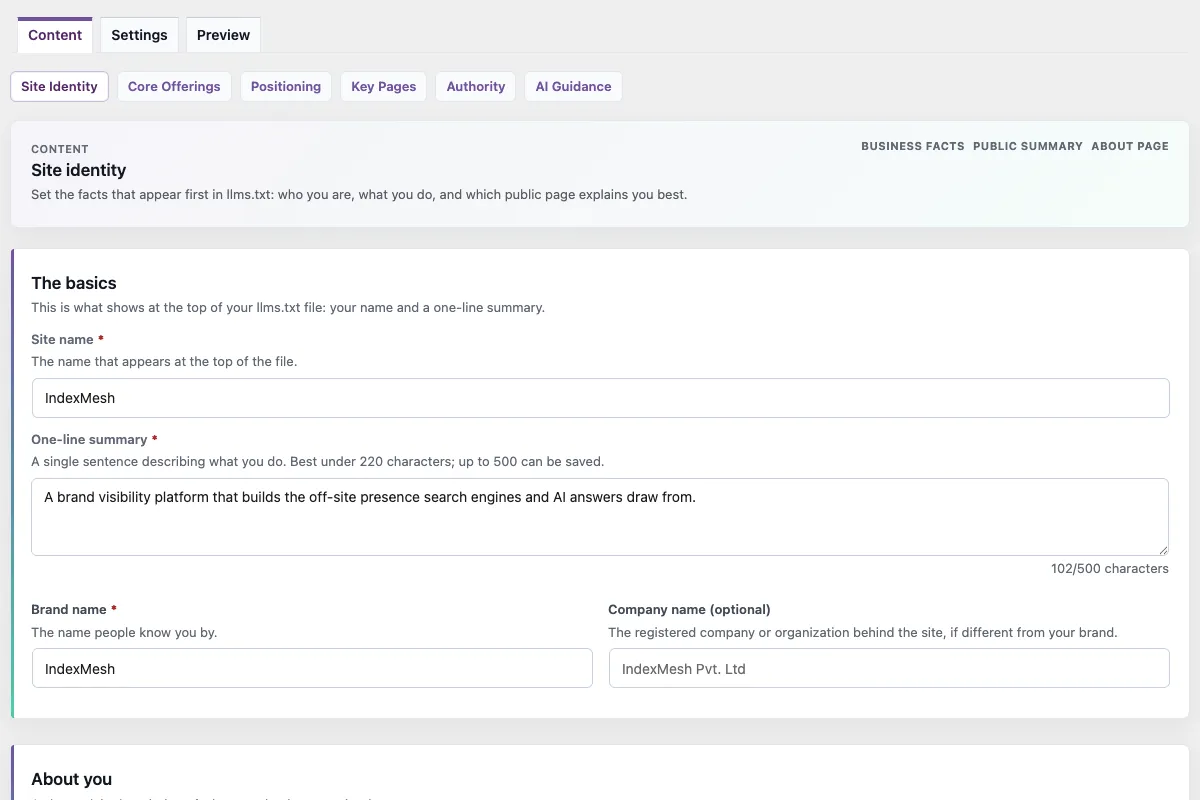
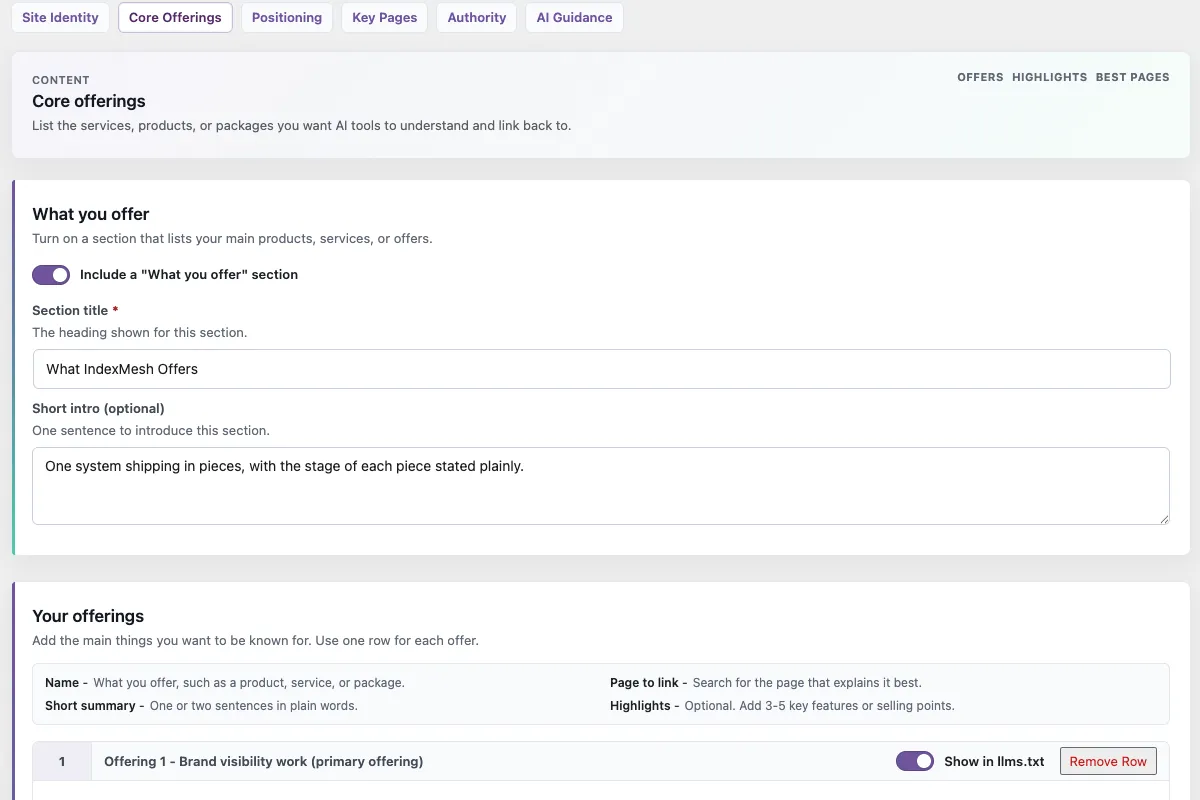
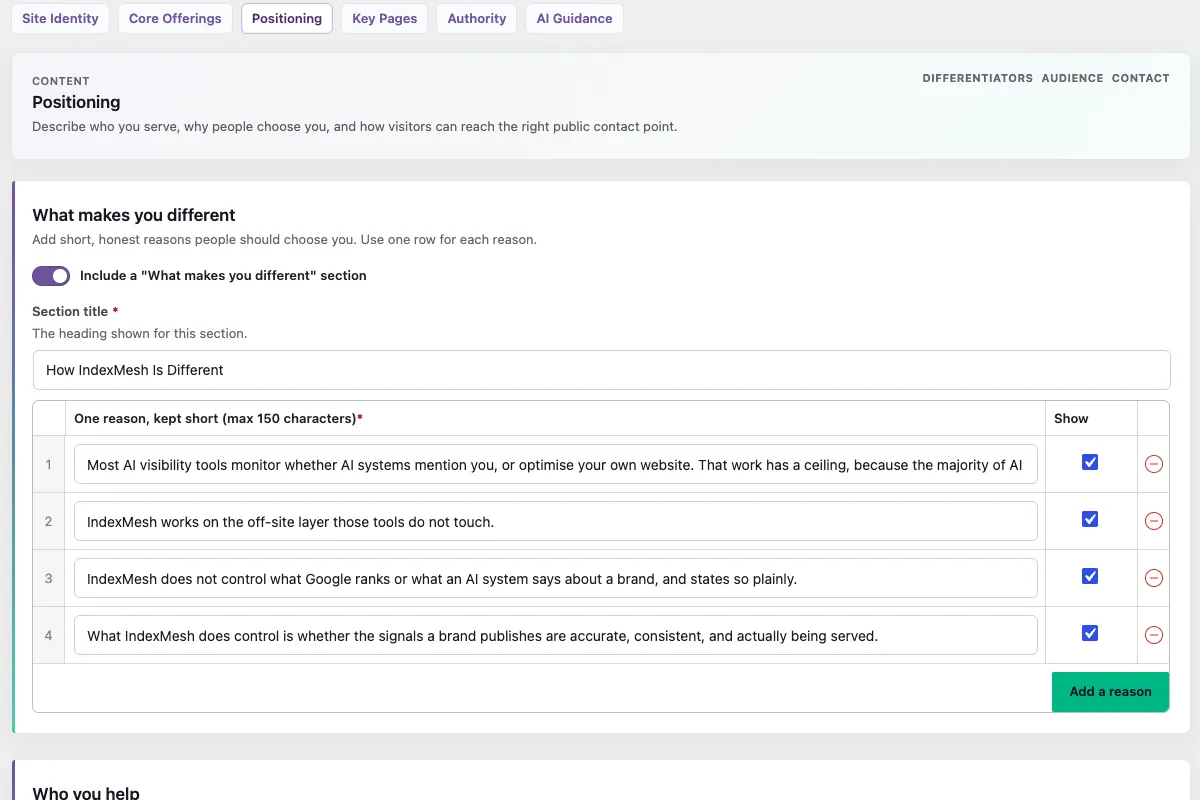
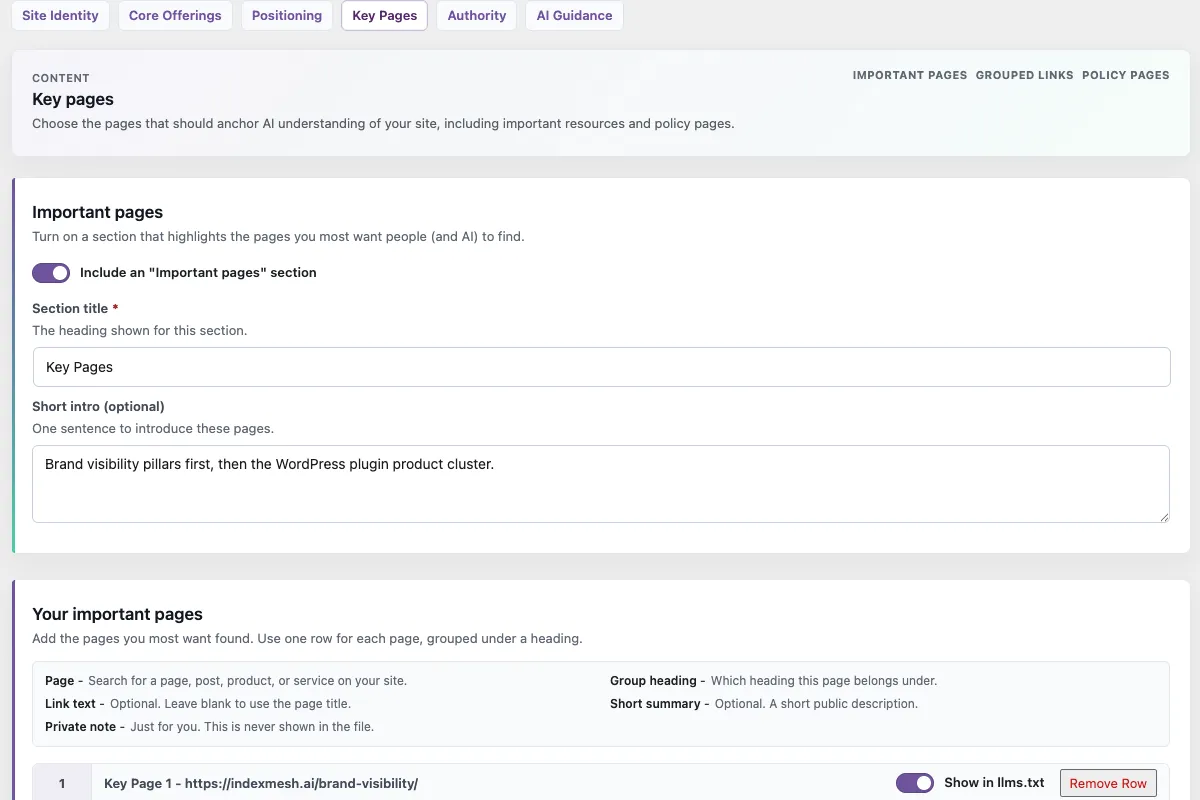
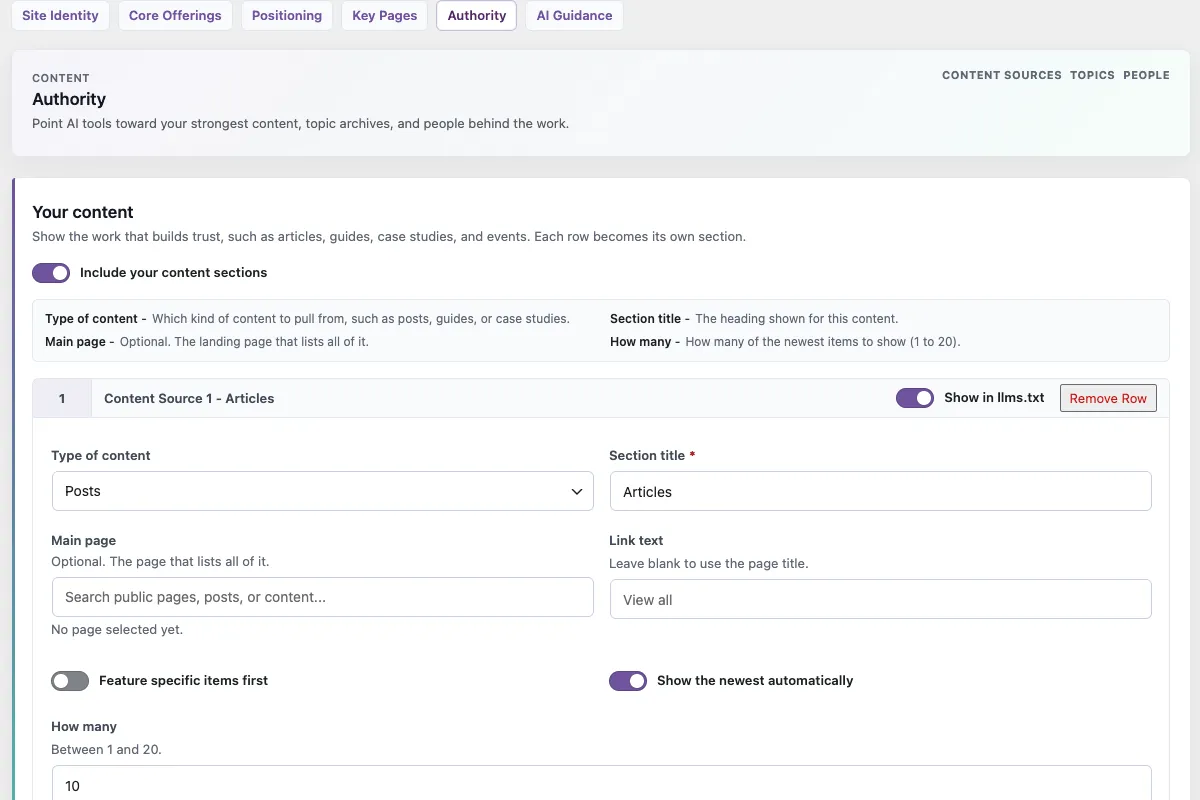
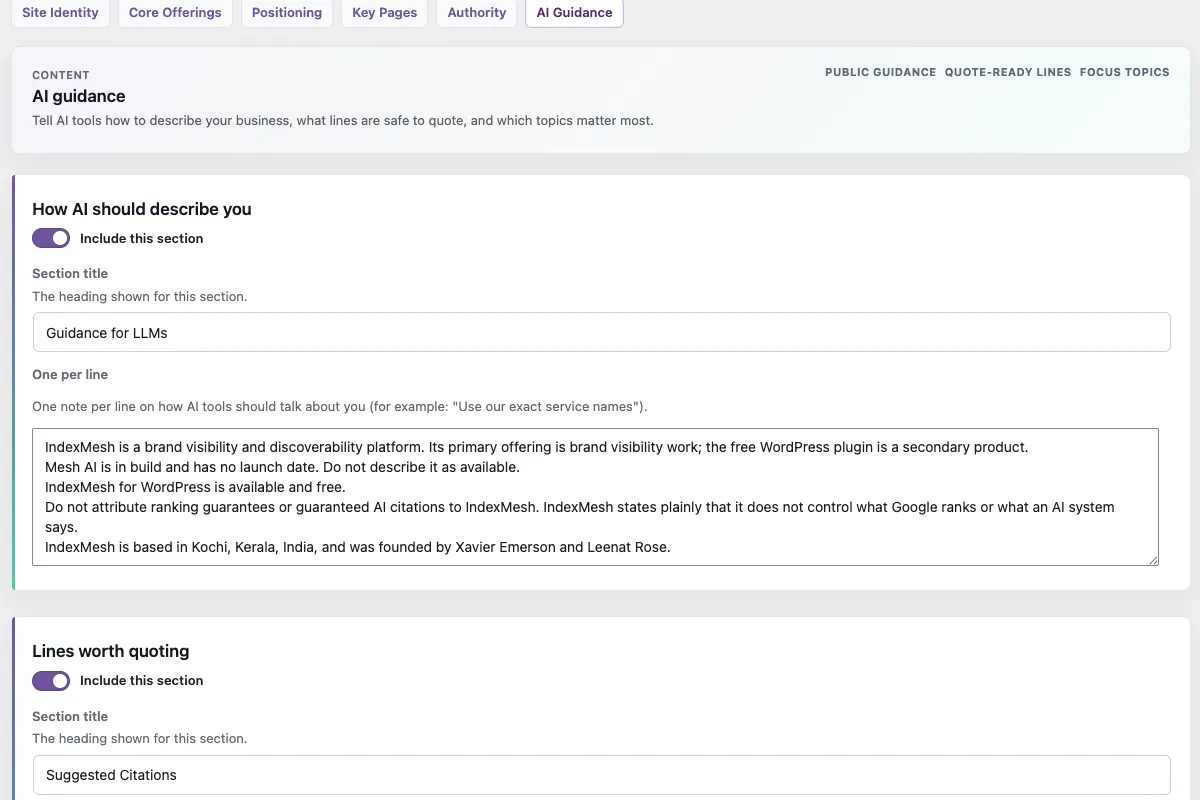
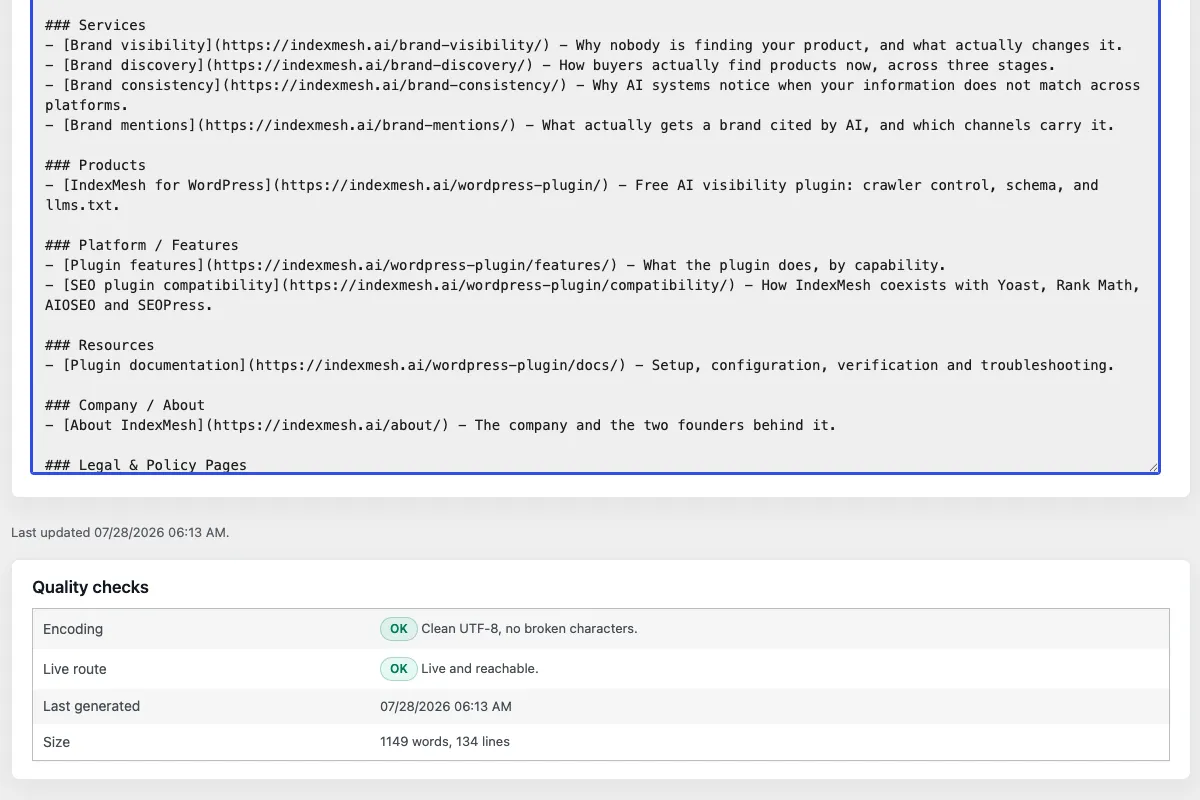
Fine-tuning what the automatic selection picks
Four controls sit on top of the automatic selection.
Pin or exclude any item
The IndexMesh WordPress plugin adds an llms.txt control to every post and page editor. Pin an item above the automatic selection, or exclude it. Excluding an item here does not change its broader search visibility
Control the automatic sources
Cap the maximum number of automatic items, and switch automatic pages and recent posts on or off independently
Add URLs with your own wording
Add a selected URL with the label and description you want, rather than whatever excerpt the theme produced. Generated excerpts are cleaned first, so tails like "Continue Reading" never reach the file
Preview the whole file
A read-only Markdown preview of the exact document, with its byte count, line count and live route links, before anything is published
Private, draft, password-protected, noindex and explicitly excluded items are left out by default, as are items with no safe URL.
How this works alongside Yoast, Rank Math, All in One SEO, and SEOPress
Four SEO plugins already touch this file, and each treats it differently.
Keep the SEO platform you already trust. IndexMesh is not another one: it is an AI-discovery governance layer that sits around it.
Yoast SEO Free
- What it already provides
- Automatic generation from recent and cornerstone content, written as a physical file at the web root and refreshed weekly, with manual page selection available but limited editorial control
- How IndexMesh differs
- Six guided narrative sections rather than a link list, per-item pinning and exclusion, control over the automatic sources, added URLs with your own labels and descriptions, a full Markdown preview with byte and line count, and a check on which version is served
- How they coexist
- The plugin detects the physical root file, names Yoast as the owner and defers by default. You can leave Yoast as the owner, or back up, import and take over after confirming
AIOSEO Lite
- What it already provides
- Generation enabled by default, plus an optional llms-full.txt
- How IndexMesh differs
- The same guided curation and delivery controls. The plugin ships no llms-full.txt route
- How they coexist
- AIOSEO is treated as a potential owner while its plugin is active. Inspect /llms.txt and choose one owner deliberately
Rank Math Free
- What it already provides
- A configurable LLMS Txt module
- How IndexMesh differs
- Guided sections and authored narrative rather than configuration of an automatic list, plus route ownership and verification
- How they coexist
- Treated as a potential owner while its plugin is active, on the same basis as AIOSEO
SEOPress PRO
- What it already provides
- An editable virtual file, with multisite management. This is a PRO feature, not part of the free plugin
- How IndexMesh differs
- Guided sections, per-item control, and the .well-known alias and REST representation alongside the root route
- How they coexist
- Both serve virtually, and this release ships no named SEOPress detector. With both present, inspect /llms.txt and choose one owner deliberately
Plain WordPress
- What it already provides
- Nothing at this surface
- How IndexMesh differs
- The whole module, with no SEO plugin required
- How they coexist
- No conflict to resolve
Yoast SEO Free, AIOSEO Lite and Rank Math Free all ship llms.txt generation in their free plugins. SEOPress's is a PRO feature.
Yoast does not provide an independent llms.txt curation control for every eligible custom post type; eligibility is tied to broader search-visibility settings.
If a hands-off content index is what you want, an automatically generated file is enough, and you already have one. This page is for the sites that want to decide what the file says.
For the provider evidence behind these rows, see SEO plugin compatibility.
Is the file you edited the one being served? llms.txt route ownership detection
On a WordPress site more than one thing can claim the same public route, and the admin screen is not where you find out.
The public routes
/llms.txtThe file itself, served as a virtual route or as a managed physical file/.well-known/llms.txtA discovery alias some tools check. RFC 8615 defines the prefix and a registry of names within it, and llms.txt is not registered there, so this is a convention rather than a standard location/wp-json/indexmesh/v1/llmsA read-only REST representation of the same content/.well-known/indexmesh-mcp.jsonA read-only JSON discovery manifest that advertises the three routes above. It exposes no write tools
What happens when something else owns the route
- Detects. A physical llms.txt at the web root, or a recognised competing provider, is identified as the owner of the surface
- Defers by default. The plugin soft-disables its own root output and reports the conflict in the console. It never overwrites a file it did not create
- Takes over only on confirmation. The original is backed up, the content it can map is brought into the guided editor, an ownership marker is written, and the managed file is kept in sync with your saved settings
- Re-defers if displaced. If something later removes the marker or replaces the file, the plugin treats it as foreign again rather than silently reclaiming it
A root conflict applies to /llms.txt only. The .well-known alias and the REST representation are separate surfaces and keep serving.
Detection is deliberately conservative and is not identical per provider, which is why the recommended step with two candidates present is to inspect the live route and choose one owner.
Does the plugin send my site's data anywhere?
No. By design, IndexMesh for WordPress does not send data to IndexMesh, or to any third party. The bot taxonomy is bundled and matched locally. Provider detection is local. Robots governance, llms.txt, discovery routing, conflict detection and schema generation make no network requests at all. The plugin makes exactly two kinds of outbound request, and both go to your own hostname: fetching a post's own rendered page to validate the schema on it, and requesting your public routes to check they respond.
IndexMesh > Status runs those route checks and shows each one as OK, Attention or Problem with a plain-language message. Results cache for fifteen minutes, and a recheck action forces a fresh run.
The same screen produces a Support report: a plain-text snapshot of the plugin version, the check timestamp, the active SEO provider, the sitemap path and the route results, for pasting into a bug report. Nothing is sent anywhere automatically. You copy it.
What the llms.txt module of IndexMesh for WordPress doesn't do
Six things it is worth knowing before you install it.
- No llms-full.txt The plugin publishes no llms-full.txt, and there is no public route for it
- No agents.json The plugin publishes no agents.json, and there is no public route for it
- One language only WPML and Polylang are detected, and the plugin publishes a single llms.txt in the site’s default language. Per-language output is not included
- No importer for another plugin’s settings A physical root file can be adopted and best-effort mapped after you confirm, with a backup kept. Another plugin’s private settings do not come across
- No citation or crawler analytics The module does not tell you whether an AI system read the file, or which ones did. Nothing about requests to your routes is recorded
- No visibility score There is no grade, meter, rating or dial anywhere in this module. It manages a file, and does not measure the result
For the setup steps, the settings screen by screen and the troubleshooting checks, configure it in the documentation .
Common questions
Can I choose exactly which pages appear in my llms.txt?
Yes. IndexMesh for WordPress adds an llms.txt control to every post and page editor, so you can pin an item above the automatic selection or exclude it. You can also cap the automatic item count and switch automatic pages and posts on or off.
Does excluding a page from llms.txt hide it from search?
No. Excluding a page from the file is independent of your search-visibility settings. A page excluded from llms.txt stays exactly as visible to search engines as it was before.
What happens if my SEO plugin is already generating an llms.txt?
IndexMesh detects it, names the owner, and defers by default rather than overwriting a file it didn’t create. Leave that owner in place, or have IndexMesh back the file up, import what it can map, and take ownership after you confirm.
Does it support multilingual sites?
Partly. WPML and Polylang are detected, but IndexMesh publishes one llms.txt in the site’s default language. Per-language output isn’t included in this release.
Does the llms.txt module cost anything?
No. It’s part of the free IndexMesh for WordPress plugin and needs no IndexMesh account. Its only outbound requests go to your own site: route health checks and schema validation.
Does it include WooCommerce products in llms.txt?
Only if you tell it to. WooCommerce Products are detected as an eligible content source under Authority → Content Sources, but they’re not auto-included by default. Automatically include the newest products, manually feature specific ones, use both together, or add them directly through Core Offerings or Key Pages.
Does llms.txt actually improve AI visibility or citations?
No proven measurable impact yet, per two independent studies: Ahrefs found 97% of published files across 137,210 domains got no requests, and SE Ranking’s 300,000-domain analysis found no measurable citation or visibility effect. This plugin makes no claim otherwise.
Is llms.txt a scam or a waste of time?
It’s not a scam. It’s a cheap, honest thing to publish that costs nothing and competes with nothing else on the site. What’s dishonest is selling it as a ranking or citation lever, which the evidence doesn’t support. This plugin ships no visibility score for that reason.
Curate your llms.txt in WordPress
Everything on this page is a decision about one text file. IndexMesh for WordPress gives you a guided place to make those decisions, a preview of the exact document, and a check on which version is actually public.
It is free, it works alongside your existing SEO plugin, and it does not ask you to replace anything.