
Screen by Screen: the IndexMesh Setup Guide WordPress Needs for AI Discovery, Robots, and Schema & Entities
Install IndexMesh for WordPress, then configure AI Discovery, Robots governance, Schema and Entities, and WP-Cron. This IndexMesh setup guide WordPress admins can follow screen by screen, naming every menu item, what to fill in on each one, and the verification step that confirms it worked.
IndexMesh for WordPress is a free plugin, available now on WordPress.org, built by IndexMesh founders Xavier Emerson and Leenat Rose. It runs entirely inside your site, needs no account or hosted service, and works alongside Yoast SEO, Rank Math, All in One SEO, SEOPress, or plain WordPress. Every screen below matches the plugin's own menu labels, so entity clarity between what you read here and what you see in wp-admin stays intact.
Key Takeaways
- Install IndexMesh for WordPress from the plugin directory and activate it. No setup wizard runs automatically, and every screen can be configured by hand.
- Four screens carry the real configuration: AI Discovery for the public llms.txt file, Robots for crawler controls, Schema & Entities for organisation data, and Status for verification.
- Two WP-Cron events keep llms.txt and schema validation current in the background, both on by default and both cleared automatically on deactivation.
- By design, the plugin sends no data to IndexMesh or to any third party. The only outbound requests target the site’s own public routes.
On this page
- The IndexMesh setup guide WordPress install and activation steps
- Set up the AI Discovery screen
- Configure robots governance presets
- Add your Schema and Entities details
- Verify the setup with Status and WP-Cron
- Roles and permissions
- What IndexMesh for WordPress stores and what leaves your site
- Troubleshooting
- Developer reference
- Common tasks
The IndexMesh setup guide WordPress install and activation steps
Install IndexMesh for WordPress from the WordPress plugin directory and activate it. No wizard opens on activation. Setup is offered instead, from three dismissible entry points: the Get started link on the Plugins screen, a notice after activation, and the welcome panel on the IndexMesh Home screen. You can dismiss all three and configure each screen by hand, which is what the rest of this guide walks through.
The Home screen also carries a Compatibility tab that shows which SEO provider it detected on your site. Check that tab first if you already run Yoast, Rank Math, AIOSEO, or SEOPress, it tells you which provider IndexMesh for WordPress is enriching rather than duplicating.
Menu labels match the plugin's own screens. The llms.txt builder sits under AI Discovery, which is IndexMesh's name for the public file and the AI-facing site summary around it. The file is llms.txt. The screen is AI Discovery. A reader will meet both words and they are not interchangeable.
| Menu item | What is there |
|---|---|
| Home | Overview, plus a Compatibility tab showing the detected SEO provider |
| AI Discovery | The builder for the public llms.txt file |
| Robots | Crawler controls, preview and advanced rules |
| Schema & Entities | Organisation, Authors, Preview, and a Schema Health tab |
| Settings | Module enablement, access control, delivery and conflict policy |
| Status | The health report and the Support report |
| Help | Links into this documentation |
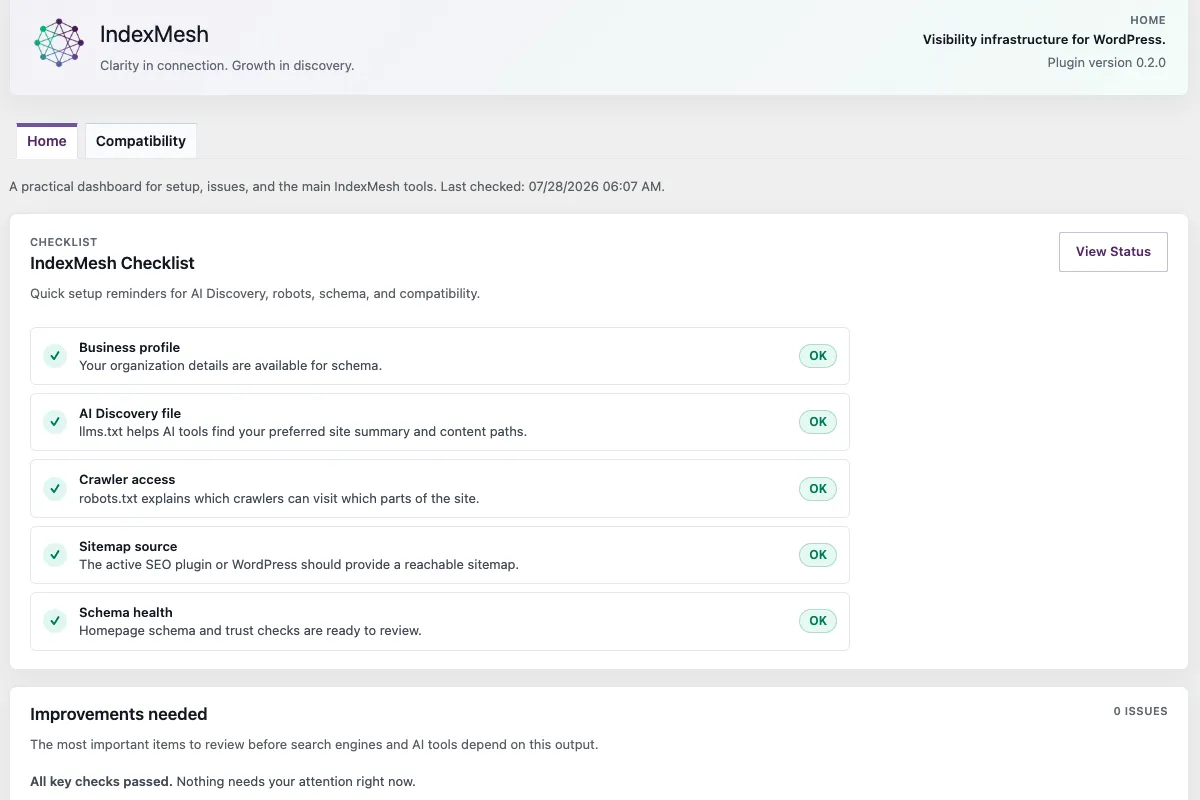
The four steps, done by hand
If you skip the guided setup, the same ground is four steps:
- Robots. Open Robots > Crawler controls and turn on the preset groups that fit your site. After saving, use Preview to see the exact robots.txt output.
- llms.txt. Open IndexMesh > AI Discovery and work through the guided sections. Fill from site info prefills detected values from your WordPress settings and Organisation schema.
- Schema. Open Schema & Entities > Your business and add your details. Author details live on each user’s WordPress profile.
- Verify. Open Status and confirm your public routes respond, then Home > Compatibility to confirm which SEO provider is active.
The plugin does not promise rankings, crawler behaviour, citations or attribution from any AI provider. It publishes machine-readable guidance and reports readiness. What another company's crawler does with it is not ours to guarantee.
Set up the AI Discovery screen
The builder lives at IndexMesh > AI Discovery and has three tabs.
| Tab | What it does |
|---|---|
| Content | Guided sections for Site Identity, Core Offerings, Positioning, Key Pages, Authority and AI Guidance |
| Preview | A read-only Markdown preview, live route links, byte count, line count and the current route state |
| Settings | Delivery and conflict policy, staging reminders, automatic source rules, import and backup, and technical route status |
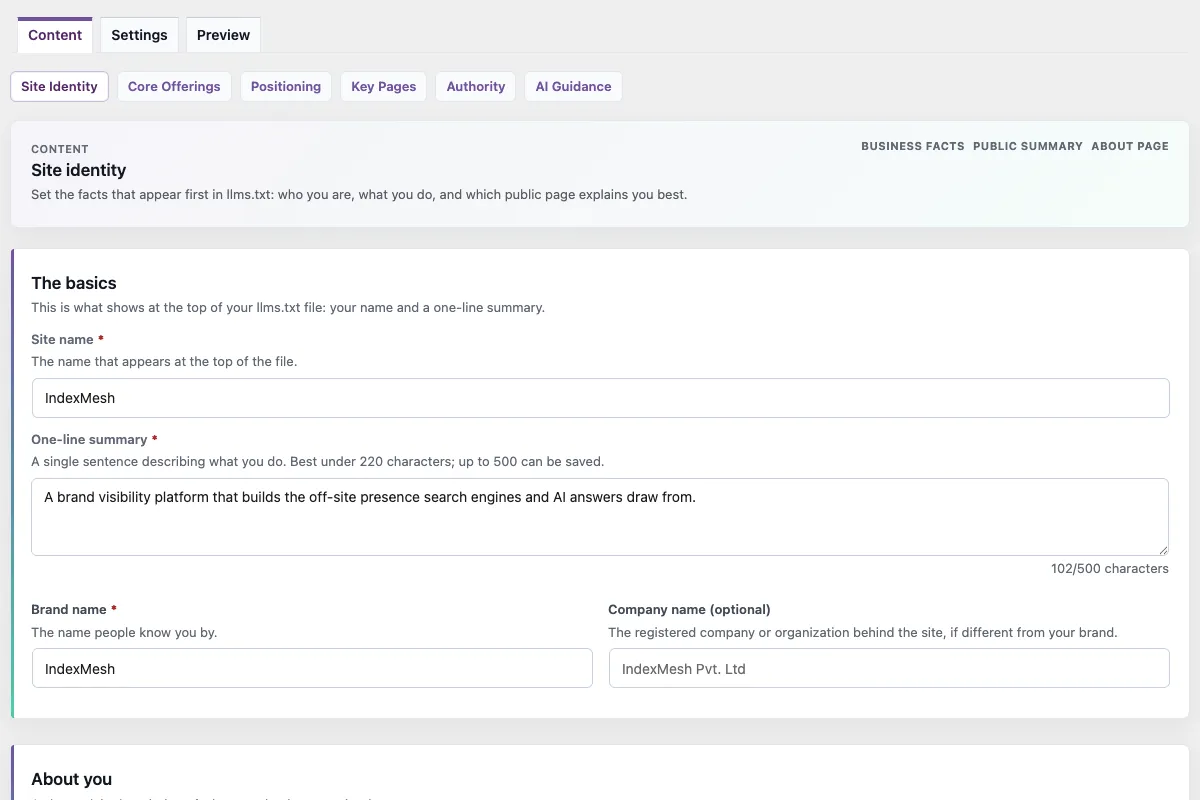
Fill from site info prefills detected values from your WordPress settings and Organisation schema, so you review rather than retype.
Per item control
Posts and pages carry an IndexMesh llms.txt control in the editor. You can exclude an item, or pin it above automatically selected content. Pinned items render first.
Advanced source rules cap the maximum number of automatic items and toggle automatic pages and recent posts independently.
What is never included
Output omits private items, drafts, password-protected content, anything marked noindex, anything explicitly excluded, and any item without a safe HTTP, HTTPS or relative URL.
Generated excerpts are cleaned before output, so theme tails such as "Continue Reading" do not end up in the public file.
Markdown is sanitised. HTML is stripped, link labels are escaped and script-like URLs are rejected, so admin markup cannot reach the public file.
The routes
| Route | What it serves |
|---|---|
/llms.txt | The Markdown file |
/.well-known/llms.txt | The same file at the discovery alias |
/wp-json/indexmesh/v1/llms | A read-only REST representation |
/.well-known/indexmesh-mcp.json | A read-only discovery manifest advertising the three above |
The manifest exposes no write tools and is not a server of any kind. It is a static description of where the other routes are.
If another plugin already produces llms.txt
The plugin detects the conflict and defers by default. It reports which source appears to own the surface and never overwrites a file it did not create.
To take over, use the Settings tab. The plugin backs up the existing file, imports the content it can map into the builder, replaces the file with its own version and marks it as IndexMesh-owned. If that marker is later removed, it treats the file as foreign again rather than silently reclaiming it.
A root conflict applies to /llms.txt only. The .well-known alias and the REST representation keep serving.
Not available in this release
llms-full.txt. agents.json. Per-language output: WPML and Polylang are detected, but the plugin publishes one file, in the site's default language. A migration importer for another plugin's file.
Configure robots governance presets
Crawler controls live at IndexMesh > Robots and compose a managed block that is appended after your existing robots.txt output.
| Tab | What it does |
|---|---|
| Crawler controls | Preset groups, each with Allow, Block or Off |
| Preview | The exact composed robots.txt output from your saved settings |
| Advanced | Per-crawler rules and additive custom directives |
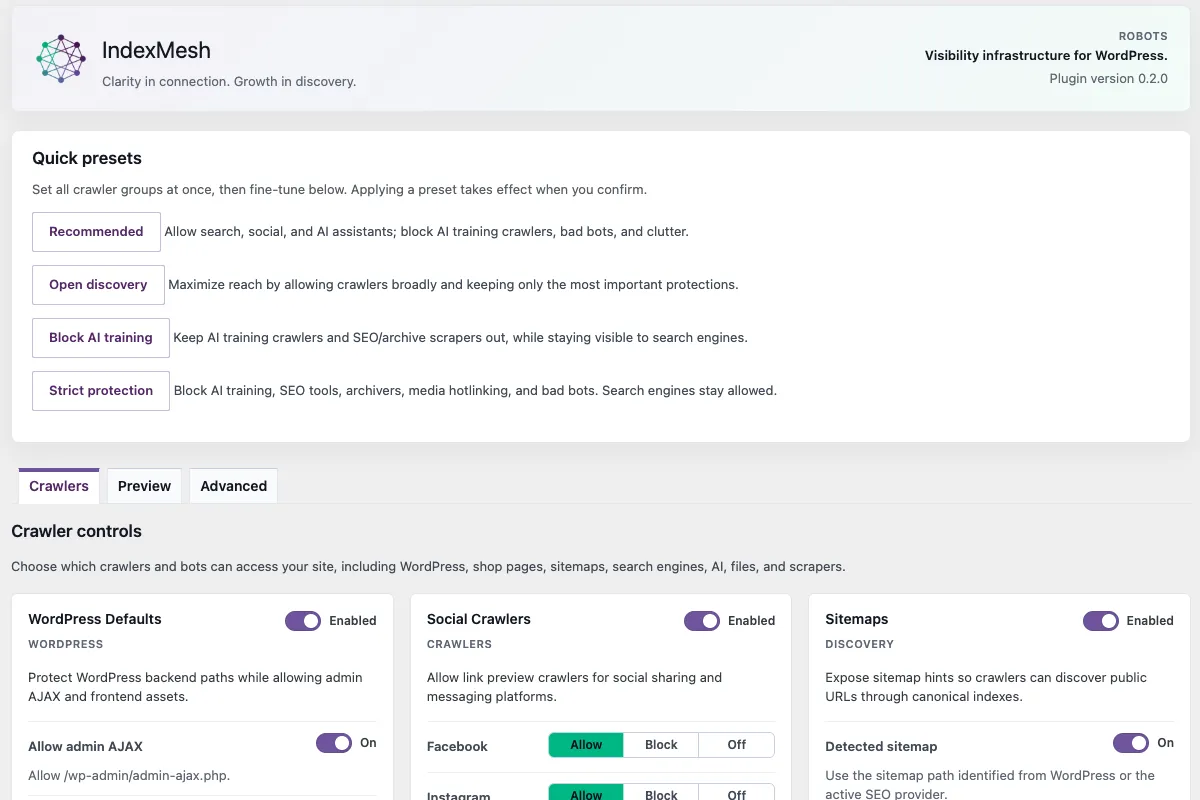
The preset groups
WordPress. Shop pages. Sitemaps. Search engines. Social. AI. Files. Scrapers.
Preset groups render before append-only custom directives, and Content Signal directives render deterministically after each user-agent group inside the IndexMesh block.
Staging, local and headless sites
The plugin does not write Disallow: / for you. If it detects a staging, local or headless environment, the top of the screen prompts you to turn on Site Access Protection.
That feature is off by default and blocks crawlers only after you turn it on.
Content Signals
Three directives: search, ai-input and ai-train.
They are advisory crawler hints. Setting one to no states a preference and does not stop a request arriving. No legal enforceability is claimed. RSL licensing emission is not in this release.
Physical file or virtual route
Virtual is the default. The plugin composes its block through the WordPress robots_txt filter, after whatever your SEO provider already contributes.
If a physical robots.txt exists at the web root, your server may serve it before any WordPress filter runs. The plugin reports that conflict rather than claiming control it does not have.
Static export reports one of five states.
| State | What it means |
|---|---|
disabled | Managed-file export is off |
virtual-only | The plugin serves through the WordPress filter only |
blocked-by-existing-file | A physical file exists that the plugin did not create, and needs an import or keep decision |
ready | Managed-file mode is on and no file exists yet |
file-synced | The plugin owns the file and keeps it in step with saved settings |
Export refuses to write unless the mode is managed-file.
The plugin never deletes a physical robots.txt, including on mode change, module disable and plugin deactivation. Turning managed-file mode off leaves the file in place for you to remove.
Importing existing rules
Import reads the physical file and the served output. Rules from other SEO plugins are read from the served output only. The plugin never reads another plugin's private settings tables.
Recognised lines map into preset groups. Unmatched lines are preserved as additive advanced directives. The decision is recorded as pending, imported or skipped.
No daily re-export
There is deliberately no re-export cron. Saves and settings changes sync the file at write time. A daily job would mask an external edit you should see.
Add your Schema and Entities details
Organisation schema is managed at IndexMesh > Schema & Entities, and author schema on each user's native WordPress profile.
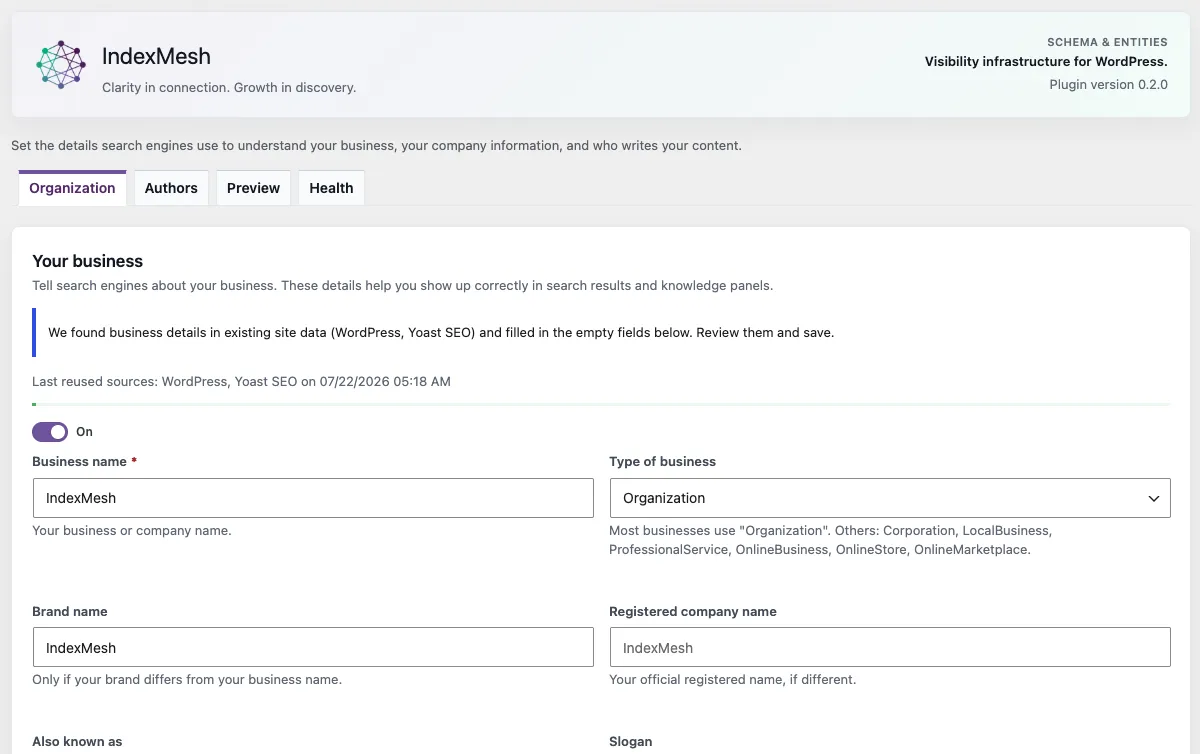
Organisation
The Organisation tab covers identity (name, type, brand, legal and alternate name, slogan, URL), a media-library logo picker, description, founding date, employees, knowsAbout, sameAs, contact point, postal address, founder Person, sub-organisations, physical offices with full addresses, the areas you serve, organisation identifiers and publishing principles.
Identifiers: vatID, taxID, iso6523Code, duns, leiCode, naics.
Publishing principles: publishingPrinciples, ownershipFundingInfo, actionableFeedbackPolicy, correctionsPolicy, ethicsPolicy, diversityPolicy, diversityStaffingReport.
A completion notice reports which recommended fields are still empty. Detected Yoast, WordPress and ACF values preload into empty fields for review before saving.
Authors
The Authors tab is a per-user table showing enabled state, job title, and knowsAbout and sameAs counts.
Author fields live on the WordPress user profile, in the IndexMesh Author Schema section, collapsed until enabled: headline, honorific prefix and suffix, job title, employer, headshot, short bio, rich-text full bio, languages, awards, knowsAbout, additional profile URLs, identifiers including Wikidata, ORCID and alumni, and optional author-archive SEO title and description.
Author sameAs priority order: website, LinkedIn, Wikidata, Wikipedia, Google Business Profile, social profiles, then ORCID.
Nothing is emitted until you enable it. Organisation output is off until an operator enables it and saves a name. Author schema is off per user until that author is enabled on their profile.
What gets emitted, and when
The decision depends on what else is running.
| What you are running | What IndexMesh does |
|---|---|
| Yoast, Rank Math or All in One SEO | Enriches the provider graph in place through its public filters |
| SEOPress | Enriches Organisation and Article in place. An eligible node SEOPress cannot accept, such as an opt-in FAQ node, is published in a separate block. An author ProfilePage is held back until you confirm SEOPress does not already output one. Organisation and Article are not repeated there |
| Plain WordPress | Publishes eligible IndexMesh JSON-LD directly |
| A detected provider with no IndexMesh adapter | Publishes eligible standalone JSON-LD rather than dropping your data |
| Schema ownership it cannot determine | Emits and enriches nothing. It defers |
| Two or more third-party schema providers | Suppresses its own output and enrichment |
Noindex, private, draft, pending, trashed, password-protected, excluded post types and per-post exclusions suppress both output and enrichment.
Open Schema & Entities > Schema Health to see the current decision.
FAQ schema
Per post, opt-in. It is eligible when a local FAQ source is detected and suppressed when another plugin's FAQ block is already on the page.
Google retired the FAQ rich result, which stopped showing on 7 May 2026 with the documentation removed on 15 June 2026. FAQPage remains valid Schema.org markup and the plugin still ships it for answer engines, not for a rich result.
The author shortcode
[indexmesh_author_info] renders author display data from IndexMesh author fields, falling back to Yoast user schema and then WordPress core.
| Attribute | Values |
|---|---|
field | name (default), seo-title, headline, title, job-title, description, short-bio, author-bio, long-bio, url, avatar, author-img-block, read-more, blog-hero, blog-footer, sameas |
id | Explicit user ID. Defaults to the current author archive or post author |
link | yes (default) or no |
tag | Optional wrapping HTML tag for text fields |
class | Optional CSS class |
size | Avatar or image size in pixels, default 300 |
Additional shortcode tags can be registered through the indexmesh_author_info_shortcode_tags filter.
Not available in this release
QAPage, HowTo, ClaimReview and Speakable are not public features. There is no durable findings history: the findings table is deliberately not installed, so lint results do not persist across sessions.
Verify the setup with Status and WP-Cron
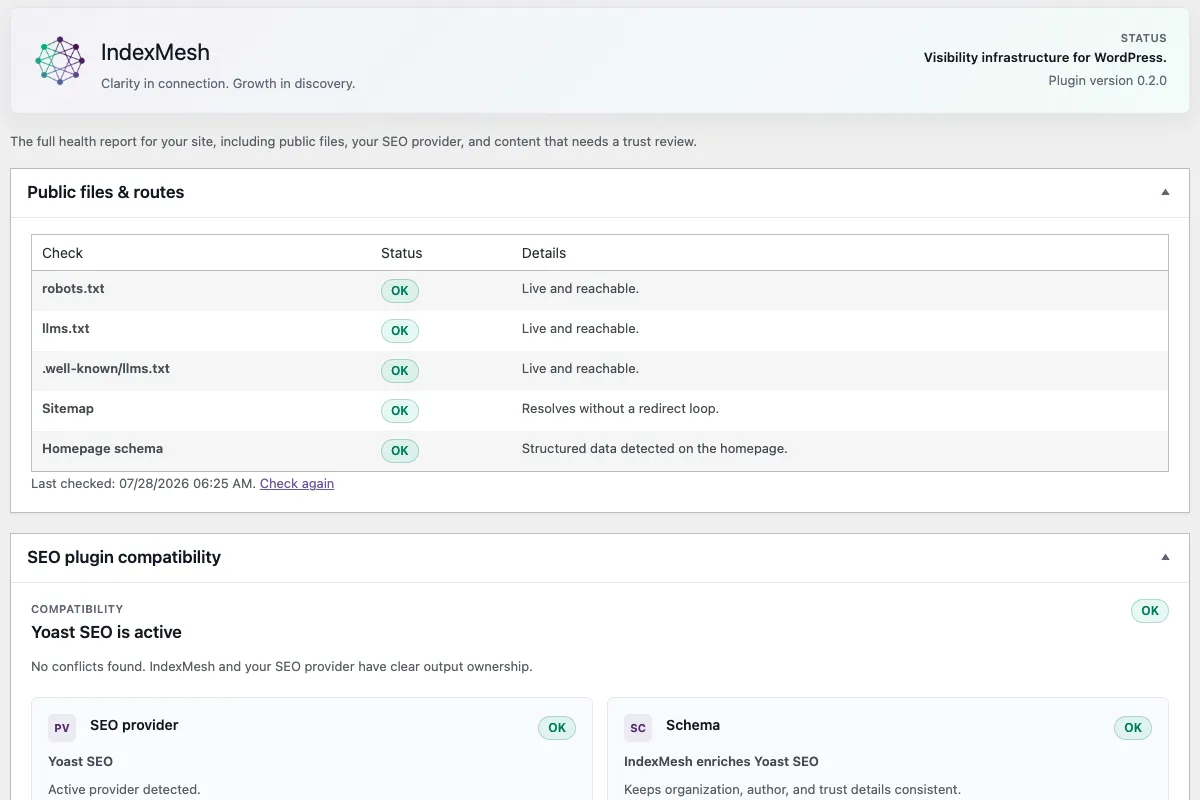
IndexMesh > Status is the health report, and the first place to look when something appears wrong.
What it checks
Public files and routes. Live checks against robots.txt, llms.txt, the .well-known mirror, your sitemap and your homepage schema. Each row shows OK, Attention or Problem with a plain-language message.
The sitemap check follows redirects with a bounded hop limit, so a redirect loop fails clearly instead of hanging.
SEO plugin compatibility. Which provider is active, and whether more than one is active at once. The plugin surfaces that state and does not resolve it for you.
Results cache for fifteen minutes. Use the recheck action to force a fresh run.
The Support report
A plain-text snapshot of the plugin version, the check timestamp, the active SEO provider, the sitemap path and the route results.
It is meant to be copied into a support request or bug report. Nothing is sent anywhere automatically.
If a row shows Attention or Problem
Public files and routes. Confirm the route resolves in a normal browser tab first. A check can fail if your host blocks the site from requesting itself, which some firewalls and security plugins do.
SEO plugin compatibility. If more than one SEO plugin is active, deactivate the one you are not using. Running two providers at once causes duplicate or conflicting schema independently of IndexMesh.
Schema. Open Schema & Entities > Schema Health for the current emission decision.
Roles and permissions
The plugin uses its own WordPress capabilities, so you can delegate content work without granting full administrative access.
| Role | Intended access |
|---|---|
| Administrator | Settings, modules, permissions, entities, diagnostics, privacy and retention |
| Editor | AI Discovery and schema content, and diagnostics review |
| Author | Their own author profile, and relevant schema readiness |
| Contributor | View robots governance and AI Discovery content, when the preset is enabled |
| IndexMesh Translator | Translated AI Discovery content and schema readiness, without broader editorial access |
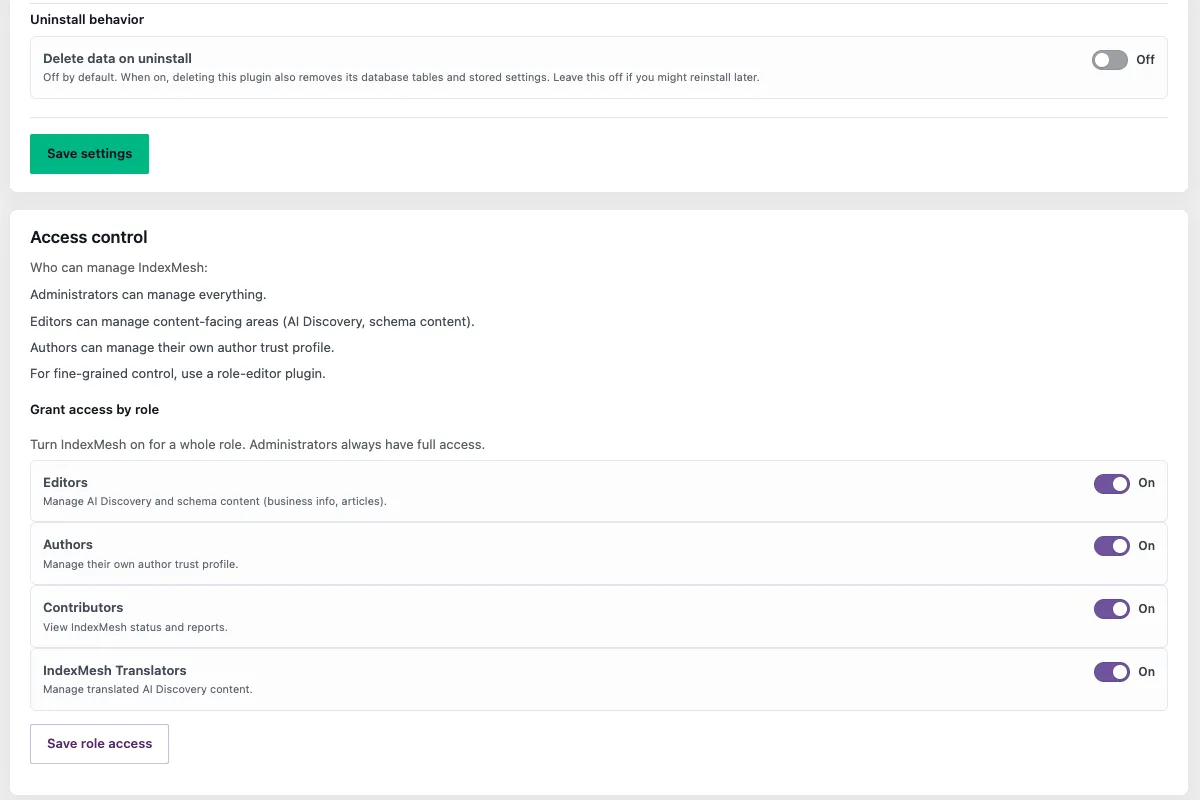
Administrators always retain full access.
Enabling a role preset
- Sign in as an administrator.
- Open IndexMesh > Settings.
- Find Access control.
- Read the description for each role.
- Turn on only the roles that need access.
Presets are off until you enable them. Turning one on grants that role the capabilities described and nothing else.
What IndexMesh for WordPress stores and what leaves your site
By design, the IndexMesh WordPress plugin does not send data to IndexMesh, or to any third party.
External requests
Two call sites make outbound HTTP requests, and both target your own hostname only.
| What | Where it goes | Why |
|---|---|---|
| Schema validation | A post’s own permalink | Fetches the rendered page to check the schema on the live page rather than the admin screen |
| Route health | Your own public routes | Checks that robots.txt, llms.txt, the .well-known mirror, your sitemap and your homepage respond |
Everything else is local. Bot matching, provider detection, robots governance, llms.txt, discovery routing, conflict detection, schema generation and citation visibility make no network requests at all.
What is stored
Options prefixed indexmesh_, covering module enablement, robots policy, llms.txt configuration, exclusion and pin lists, conflict policy, notice dismissal state, and the Organisation and author schema you enter.
Author fields live in native WordPress user meta.
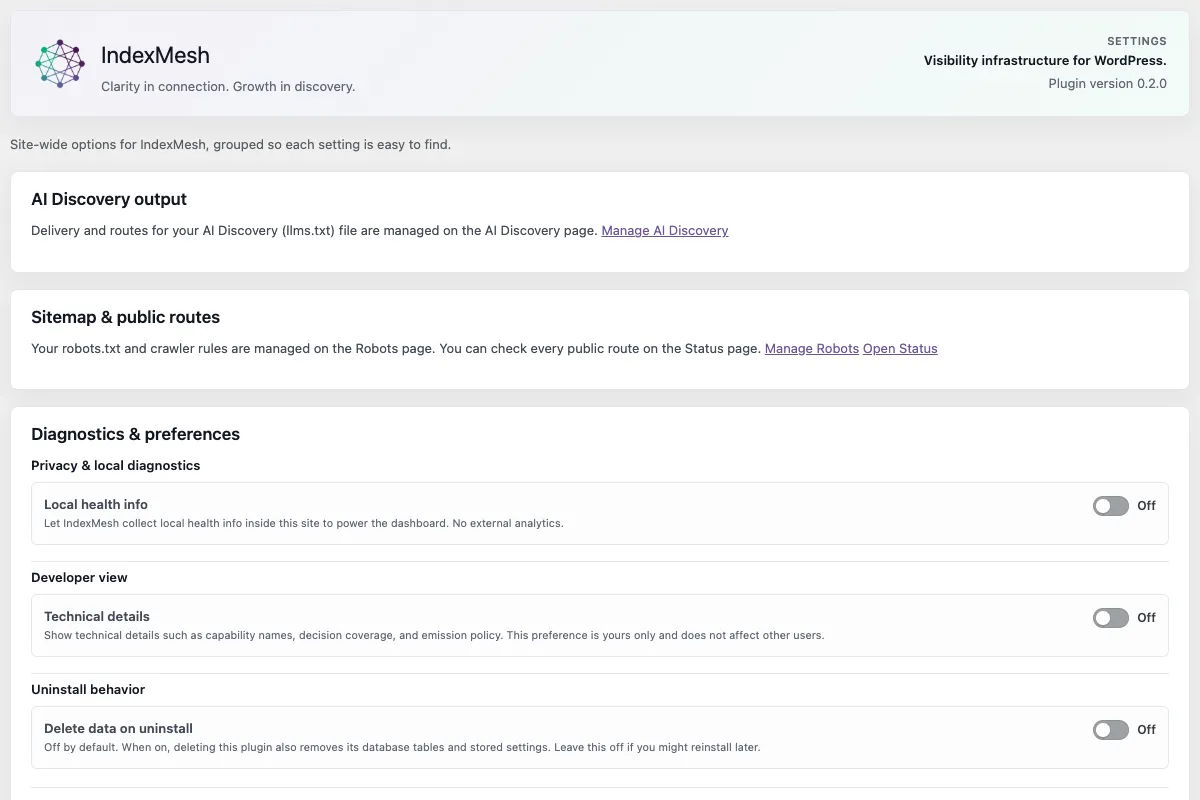
No audit log and no findings table are created in this release. The indexmesh_audit_log and indexmesh_findings tables are dormant. No request metadata, user-agent text or IP data is written anywhere.
Citation visibility stores nothing. No citation events, no IP addresses, no request logs, no provider keys, no scoring data. It exposes read-only signals derived from the bundled bot taxonomy.
Background activity
Two daily WP-Cron events, both on by default.
| Event | What it does |
|---|---|
indexmesh_llms_daily_refresh | Clears the cached llms.txt output and re-syncs the managed file if one is enabled, so content edits reach the served document without a manual save |
indexmesh_daily_schema_validation | Runs the local schema lint rules against a bounded batch of published content |
Both are cleared on deactivation and do not run again until the plugin is reactivated.
Integrations that are wired and not switched on
Google Search Console and the Redirection plugin are status seams only. No OAuth token is stored and Google is never called. They exist so surrounding work has somewhere to report state.
Troubleshooting
Most reported problems are one of four things.
The plugin will not activate
Confirm the server meets the PHP and WordPress versions in readme.txt. Confirm the plugin directory is named indexmesh. Check PHP error logs for fatal errors from custom code or a conflicting autoloader. Confirm no deployment step removed src/Plugin.php.
Output looks stale or missing
Check for a physical file in the web root. Purge page cache, object cache, CDN cache and host-level cache. Confirm rewrite rules are active.
Provider behaviour looks wrong
Confirm which SEO provider is active, and whether more than one is. Review that provider’s own noindex, schema, canonical and robots settings. Disable caching temporarily while verifying generated output.
llms.txt is not what you expect
Check whether a static llms.txt already exists. Check whether cache or CDN rules are serving an older copy. Check whether noindex or an exclusion is suppressing content you expected. Check whether the selected delivery channel is enabled. Check whether pinned links or excluded IDs in Advanced are changing the output.
Developer reference
The Core layer is read-only and performs no provider writes.
Names
| Thing | Value |
|---|---|
| PHP namespace | IndexMesh |
| REST namespace | indexmesh/v1 |
| Option, capability, table and hook prefix | indexmesh_ |
| Slash-style hooks | indexmesh/... |
Read-only REST routes
GET /wp-json/indexmesh/v1/status
GET /wp-json/indexmesh/v1/citations/signals
GET /wp-json/indexmesh/v1/schema/diagnostics
GET /wp-json/indexmesh/v1/llms
Registries
Module Registry, IndexMesh\Core\ModuleRegistry. Modules implement ModuleInterface and register by lazy factory callback, so a disabled module is never constructed. Register through the indexmesh_register_modules action rather than modifying the bootstrap.
SEO Provider Registry, IndexMesh\Provider\SeoProviderRegistry. Adapters expose read-only status and conservative capability flags for titles, meta descriptions, canonicals, noindex, schema graph support and redirects. Core reads no private provider tables and requires no SEO plugin.
Schema enrichment filters used
| Provider | Filters |
|---|---|
| Yoast | wpseo_schema_organization, wpseo_schema_person_data, wpseo_schema_article, wpseo_schema_graph |
| Rank Math | rank_math/json_ld |
| All in One SEO | aioseo_schema_output |
| SEOPress | seopress_get_json_data_organization, seopress_pro_get_json_data_article |
Providers receiving the supplemental block are filterable via indexmesh_supplemental_node_providers.
Capabilities
indexmesh_view_schema, indexmesh_edit_schema, indexmesh_manage_entity_store, indexmesh_eeat_can_review, indexmesh_ymyl_domain.
Common tasks
Five things people ask for by name, each answered in one place.
How do I publish an llms.txt file?
Open IndexMesh > AI Discovery, work through the guided sections, and use Fill from site info to prefill detected values. Check the Preview tab, then confirm the file is live at /llms.txt. If another plugin already produces one, the plugin defers and tells you. Take over from the Settings tab.
How do I block AI crawlers?
Open IndexMesh > Robots > Crawler controls and set the AI preset group to Block, or use the Advanced tab for individual crawlers. Save, check the Preview tab, and confirm on the Status page that the file is really being served. Read /ai-crawlers/ first if you are unsure which to block. The categories do different jobs, and blocking the wrong one is the common mistake.
How do I use IndexMesh for WordPress with Yoast, Rank Math, All in One SEO, or SEOPress?
Install it alongside. The IndexMesh WordPress plugin detects the provider and adapts, enriching that provider’s schema graph rather than publishing a second one. Confirm what it detected at Home > Compatibility, and see the emission table in section 4 for what it does in each case.
Does IndexMesh for WordPress change my content or my theme?
No. It writes no post content, no theme files and no other plugin’s settings. It adds schema output or enrichment, serves the llms.txt routes, and composes a managed block in robots.txt. The one file it can write is a physical robots.txt or llms.txt, and only after you confirm.
How do I know everything is working?
Open IndexMesh > Status. It checks your public routes the way a crawler would and reports each as OK, Attention or Problem. Copy the Support report from that screen if you need to raise something.
Does IndexMesh for WordPress promise better AI citations once setup is complete?
No. It publishes machine-readable guidance and reports readiness. It does not promise rankings, crawler behaviour, citations, or attribution from any AI provider, what another company's crawler does with that guidance isn't something any plugin can guarantee.
Last updated .
Ready to see it on your own site? Get IndexMesh for WordPress on WordPress.org and start with Robots > Crawler controls.
Found something this page does not answer? Contact us.