
What WordPress AI Plugin Features Actually Cover
For a WordPress site owner already running Yoast, Rank Math, All in One SEO, or SEOPress, the IndexMesh WordPress plugin manages AI crawler access, a curated llms.txt, organisation and author schema, and a check that each one is actually being served, all read from one shared record of the business rather than configured three separate times, or bundled inside your SEO plugin's own AI features with a visibility score attached.
Each of those four surfaces already exists as a standalone tool somewhere. What is harder to find is one that runs them from a single record of who your brand is, so the three descriptions of your site can't quietly drift apart from each other. That's what these WordPress AI plugin features actually add, for a site owner already running Yoast, Rank Math, All in One SEO, or SEOPress and deciding whether a second plugin is worth it.
AI Crawler Access, llms.txt and Schema in One Plugin, in Short
- Three controls, one shared business record: AI crawler access, a curated llms.txt, and organisation/author schema.
- One provider detection for three modules, so crawler governance, llms.txt and schema never disagree about what's installed.
- Enriches your SEO plugin's existing schema instead of publishing a second, competing one.
- A verification pass checks what a crawler actually receives, not just what your settings say.
- The plugin does not send data to IndexMesh, or to any third party.
What the plugin manages, and what each control is for
Three modules, each with its own decision to make and its own way of being wrong.
AI crawler access
- What you manage
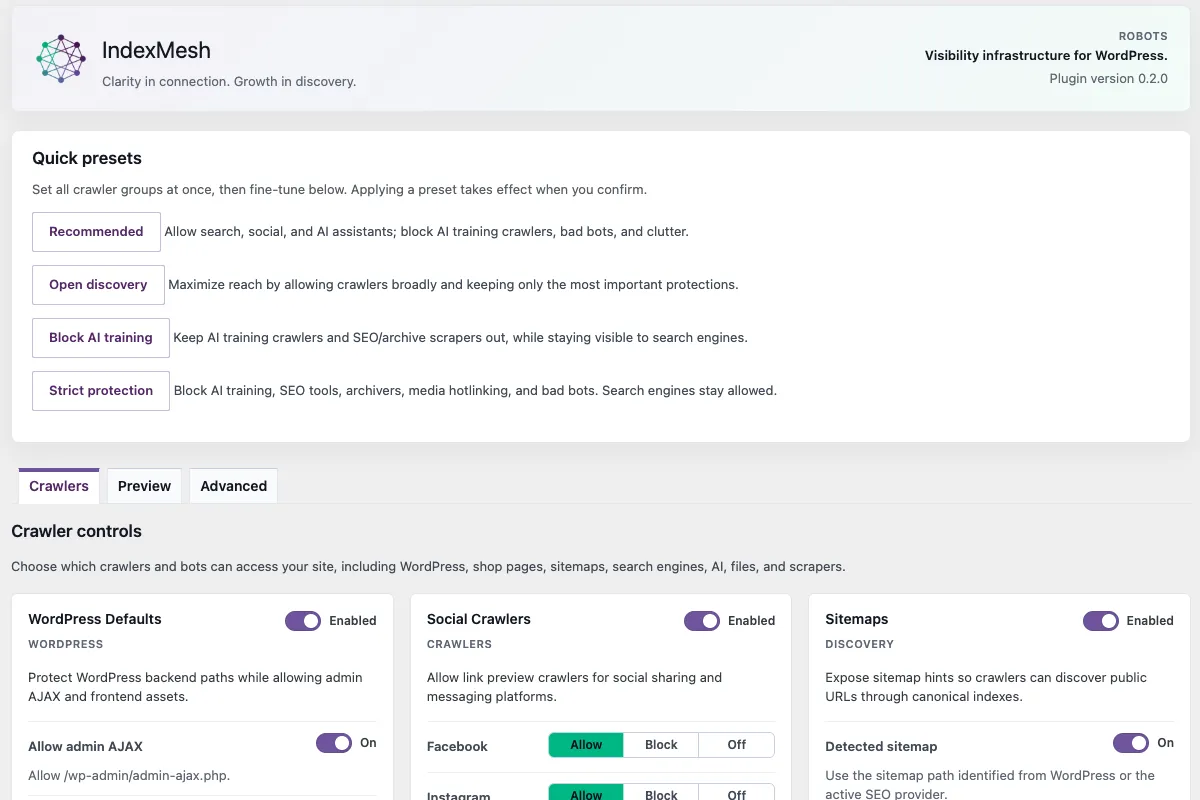
- Allow, Block or Off per agent, plus preset groups organised by what each crawler is for
- Example use case
- You want AI search and retrieval agents to keep reaching the site while declining training crawlers
- Practical advantage
- "Block AI" stops being one decision and becomes several, each with a different consequence
- IndexMesh proof
- A curated offline bot taxonomy with training, user-action, search-retrieval and opt-out-token tiers, per-agent controls, a composed robots.txt preview, and physical-file ownership detection
llms.txt
- What you manage
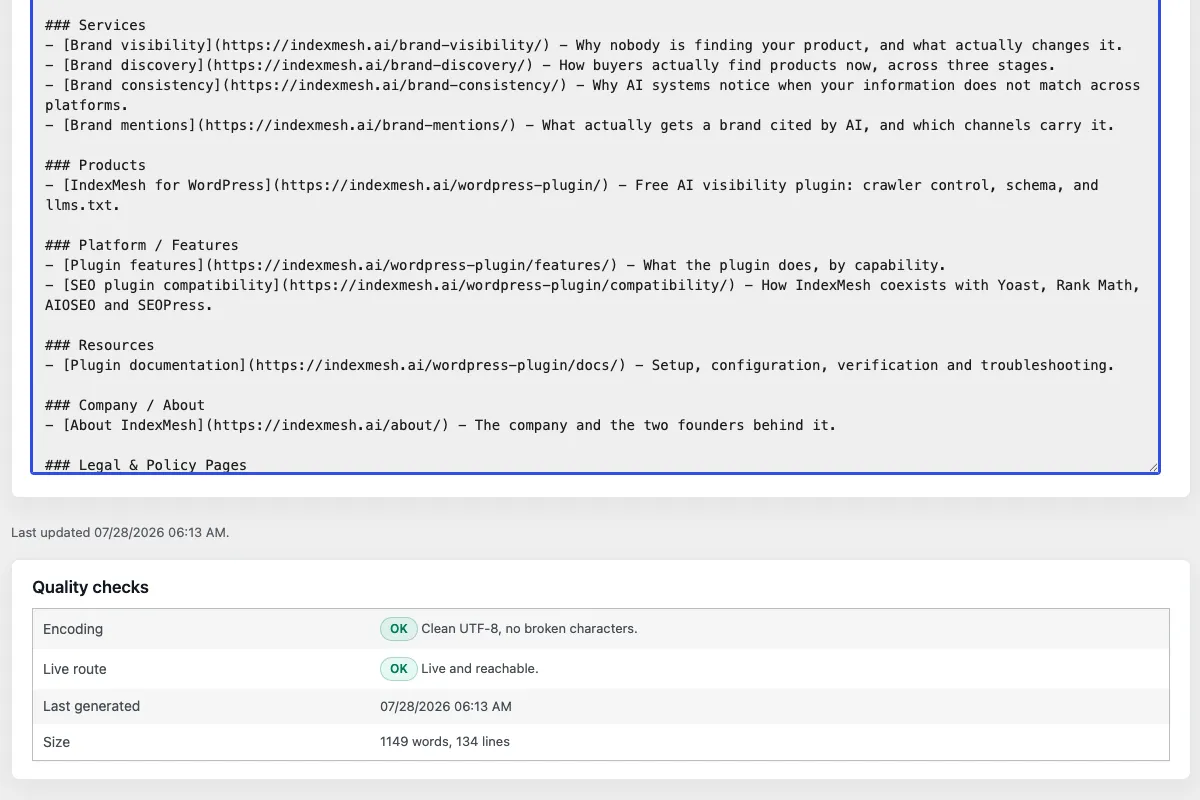
- Guided sections for site identity, offerings, positioning, key pages, authority and AI guidance, with per-item pinning and exclusion
- Example use case
- Your file lists the ten most recent posts and says almost nothing about the business behind them
- Practical advantage
- The file reads as a description of the organisation rather than an index of recent content
- IndexMesh proof
- Guided tabs, configurable automatic sources, a Markdown preview with byte and line count, /llms.txt and /.well-known/llms.txt, and conflict detection that defers by default
Organisation and author schema
- What you manage
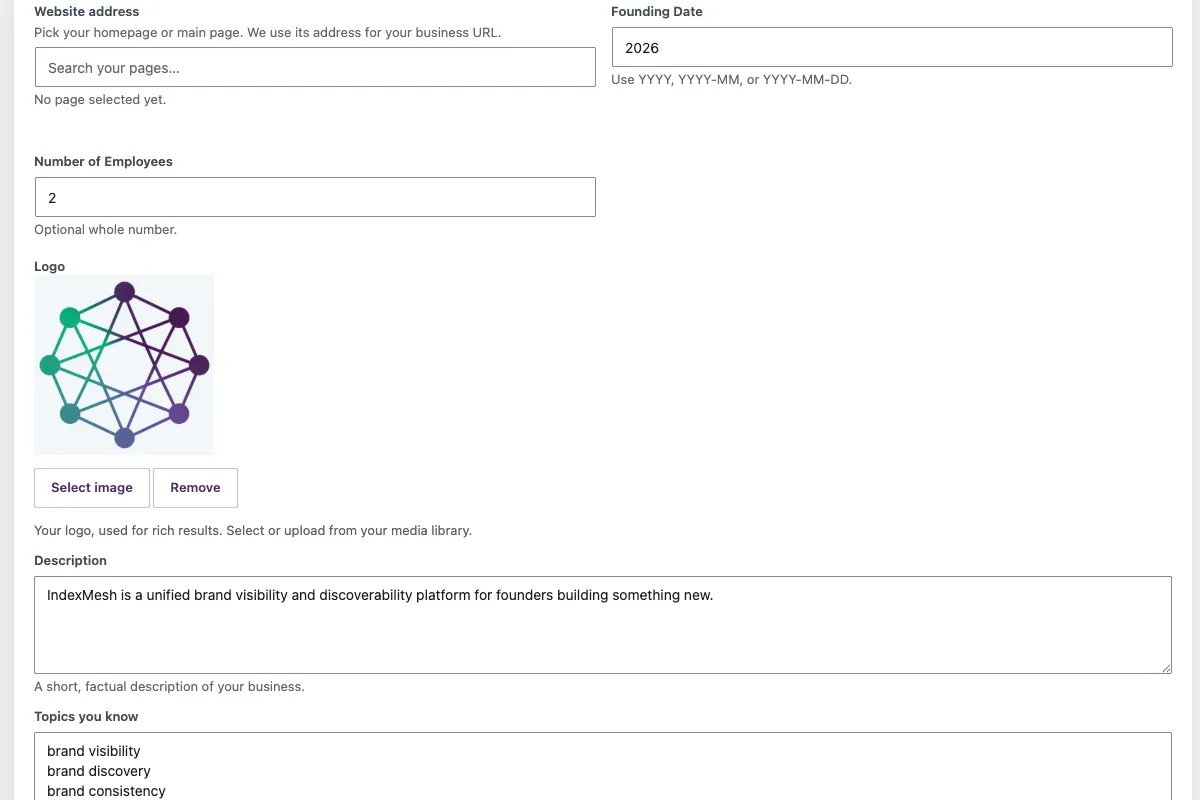
- Business identity and identifiers, founders, related businesses, offices, service areas, and author expertise on the native WordPress user profile
- Example use case
- Your SEO plugin publishes an Organization node and a second plugin publishes another one beside it
- Practical advantage
- The test is whether two nodes claim to be the same entity, not how many script blocks a page has
- IndexMesh proof
- Provider-aware emission: in-place enrichment through public filters where supported, limited supplemental output where required, standalone output on plain WordPress, and nothing at all when ownership cannot be determined safely
Each of the three is a control model rather than a file, which is the part that survives when the file formats change.
How These WordPress AI Plugin Features Work Together
Individually each of these is available somewhere else; what is harder to assemble is three controls written from one record of who you are.
- One provider detection, used by all three
- A read-only registry reports which SEO plugin is active. Crawler governance, llms.txt and schema all read the same answer, so three modules cannot disagree about what is installed
- One set of business details
- The organisation you enter once is what schema publishes, what the llms.txt builder can prefill from, and what the site says about itself in both places
- One ownership posture
- Every surface it can write to, it checks first. It never deletes a file it did not create and never replaces a foreign one without your confirmation
- One verification pass
- The same health report checks robots.txt, llms.txt, the .well-known mirror, the sitemap and homepage schema, because the failure is usually the same failure in three places
Three tools that each describe your site separately will eventually describe it differently.
Is the file you configured the file being served?
A settings screen reports what you saved, which is not the same thing as what a crawler receives.
A physical file at the web root can take precedence over a route WordPress generates on the fly. A cache can serve an old copy, a security plugin can block the request, another plugin can claim the same URL, and a CDN can miss the folder. None of that changes anything inside your settings, so nothing in your settings tells you. The IndexMesh WordPress plugin requests robots.txt, llms.txt, the .well-known mirror, your sitemap and your homepage the way a crawler would, follows sitemap redirects with a bounded hop limit so a loop fails clearly instead of hanging, and reports what actually came back.
These are the only outbound requests the plugin makes, and every one of them goes to your own site.
By design, the IndexMesh WordPress plugin does not send data to IndexMesh, or to any third party. The bot taxonomy is bundled and matched locally, provider detection is local, and robots governance, llms.txt, discovery routing, conflict detection and schema generation make no network requests at all.
Two daily WP-Cron events run, both on by default and both cleared when the plugin is deactivated. One refreshes the cached llms.txt so content edits reach the served file without a manual save. The other runs the local schema checks against a bounded batch of published content.
If you audit your site's cron list, those are the two entries with our name on them.
A check that succeeds proves the route responded. It does not prove the content is current, and it cannot see a rule applied by your host, CDN or firewall, so an external check is still worth doing once.
Each control, in detail
Each module has its own page covering the control model, the situations it is for, and how it behaves beside the SEO plugin you already run.
AI crawler controls
Which agents are asking, what each one is for, and what an Allow, Block or Off decision costs on each. Includes advisory Content Signals and the ownership question when a physical robots.txt already exists.
llms.txt
Guided sections instead of a generated link list, per-item pinning and exclusion, a preview of the exact file, and detection of who currently owns the root route.
Schema and entities
Organisation identity, identifiers, offices and founders, plus author expertise on the native user profile, emitted through your provider's own filters rather than beside them.
If you want the subject rather than the implementation, the reference pages are llms.txt, AI crawlers and schema.
What each module looks like
One screen from each of the three, from the shipping plugin.
Where this sits next to the SEO plugin you already run
IndexMesh for WordPress detects the active provider, reads what it exposes, and writes to none of it.
Keep the SEO platform you already trust. IndexMesh is not another one: it is an AI-discovery governance layer that sits around it.
- Detection
- A read-only registry reports Yoast, Rank Math, All in One SEO, SEOPress or plain WordPress. Plain WordPress is a supported state, not a fallback state
- Read-only toward providers
- It reads what a provider exposes publicly. It does not read private provider settings tables and does not write to another plugin's data
- Enrich rather than duplicate
- Schema goes through the provider's own public filters where they exist. Where a node cannot be accepted in place, it is emitted separately with its own identity, and the provider's Organization and Article are not repeated
- Defer when ownership is unclear
- Two active schema providers, or a root file it did not create, and the plugin reports the conflict instead of guessing
What it does not do
Some of this is deferred and some of it is a category we have decided not to enter, and the difference is worth stating.
It does not track citations
Basic citation visibility is local and read-only: user-agent matches against a bundled offline taxonomy. It stores no request logs, no IP addresses and no citation events, and a match is not proof that a rule was obeyed or that anything was cited
There is no score
No visibility score, no grade, no rating. Completion notices inside the plugin tell an operator which recommended fields are still empty, and that is the extent of it
Some routes are deferred
llms-full.txt, agents.json and RSL licence emission have no public route in this release. The discovery manifest is read-only and is not an MCP server
One file, one language
WPML and Polylang are detected, but the plugin publishes a single llms.txt in the site’s default language. Per-language output is not included
Signals are voluntary
robots.txt is honoured by the major operators by convention rather than by force, and Content Signals are advisory preferences with no legal enforceability. Nothing here compels a crawler to do anything
None of these limits is a reason to buy anything. They are here because a page listing what a plugin does is only checkable if it also says where it stops.
Two things wired and deliberately not switched on
Stated because a reader who finds them in the code should find them here first.
| Seam | State |
|---|---|
| Google Search Console | A status seam only. No OAuth token is stored and Google is never called, until a future module ships an explicit connection flow you start |
| Redirection plugin | Coexistence status only. The plugin reports what it detects and resolves nothing |
Neither is a feature and neither is described as coming. They exist because the surrounding work needed a place to report state, and naming them is cheaper than being asked why a search-console string appears in a plugin that claims to make no external requests.
Common questions
Is IndexMesh a replacement for Yoast, Rank Math, All in One SEO or SEOPress?
No. It detects whichever of those you run, reads what it exposes publicly, and writes to none of it. It is a governance layer for AI crawler access, llms.txt and schema that sits around your existing SEO plugin, not a rival SEO plugin.
How is this different from All in One SEO's own AI features?
All in One SEO bundles an llms.txt generator, schema markup, AI crawler control and an AI Search Rank Tracking feature with a visibility score. IndexMesh runs the same three surfaces from one provider detection and one business record, and makes no visibility-score claim at all.
Does the plugin send my data to IndexMesh?
No. The plugin does not send data to IndexMesh, or to any third party. Bot taxonomy matching and provider detection run locally, and robots governance, llms.txt, discovery routing, conflict detection and schema generation make no network requests. The only outbound requests it makes are to your own site.
What are the two WP-Cron events for?
One refreshes the cached llms.txt so edits reach the served file without a manual save. The other runs local schema checks against a bounded batch of published content. Both are on by default and both are cleared automatically when the plugin is deactivated.
Does IndexMesh give my site a visibility score?
No. There is no score, grade or rating anywhere in the plugin. Completion notices point out which recommended fields are still empty, and that is the extent of it.
Running all three on one site
Every control on this page can be operated by hand. The plugin is free, runs entirely on your own site, needs no account, and works alongside Yoast SEO, Rank Math, All in One SEO and SEOPress, or on plain WordPress.
The overview covers setup, support and pricing in one place.
Clarity in connection. Growth in discovery.