
Can You Trust AI Visibility Plugin Compatibility with Your Existing SEO Plugin?
Yes. AI visibility plugin compatibility, including full AIOSEO SEOPress compatibility, is designed into IndexMesh for WordPress from the start. It works alongside Yoast SEO, Rank Math, All in One SEO, SEOPress, or plain WordPress, enriching each provider's schema instead of duplicating it or overwriting its output.
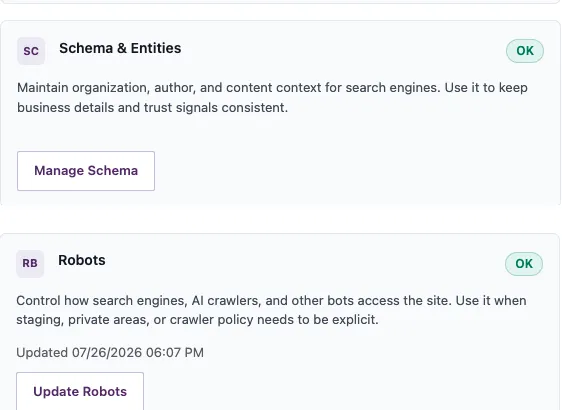
That question matters because neither Yoast SEO nor All in One SEO document what happens when you add a companion AI visibility plugin on top of them, and Rank Math's own knowledge base warns against keeping two SEO plugins active at once. IndexMesh for WordPress was built to answer the coexistence question those providers leave open: it detects your active provider, names it, and stays read only toward it. For everything else the plugin manages beyond compatibility, see the full feature list.
AI Visibility Plugin Compatibility In Short
- It works alongside Yoast SEO, Rank Math, All in One SEO, SEOPress, or plain WordPress, and no SEO plugin is required.
- It enriches your provider's existing schema graph instead of publishing a second, competing one.
- It reads what a provider exposes publicly and never writes to another plugin's data.
- It detects if a provider already generates llms.txt, names the owner, and defers to it by default.
- It requires WordPress 6.5+ and PHP 8.1+, and is currently at version 0.2.0.
What IndexMesh for WordPress needs to run
Four short facts, each independently checkable in the plugin's own files.
- WordPress 6.5 or later, tested up to WordPress 7.0.
- PHP 8.1 or later.
- Standard REST API availability. It registers its own routes under indexmesh/v1 and needs no special server configuration beyond a normal WordPress REST setup.
- Two daily WP-Cron events, both cleared automatically when the plugin is deactivated. They make requests only to your own site, never to a third party.
Current as of version 0.2.0. For the REST route list and the exact cron event names, see the setup guide.
How coexistence actually works
- Detection. On every screen, IndexMesh for WordPress detects the active provider and names it.
- One entity, not one script block. It adds your organisation, author, and trust details to the provider's existing schema graph where it can. The goal is not to force everything into one script block. It is to avoid two nodes claiming to be the same entity.
- Read only toward providers. It reads what a provider exposes. It never writes to another plugin's data.
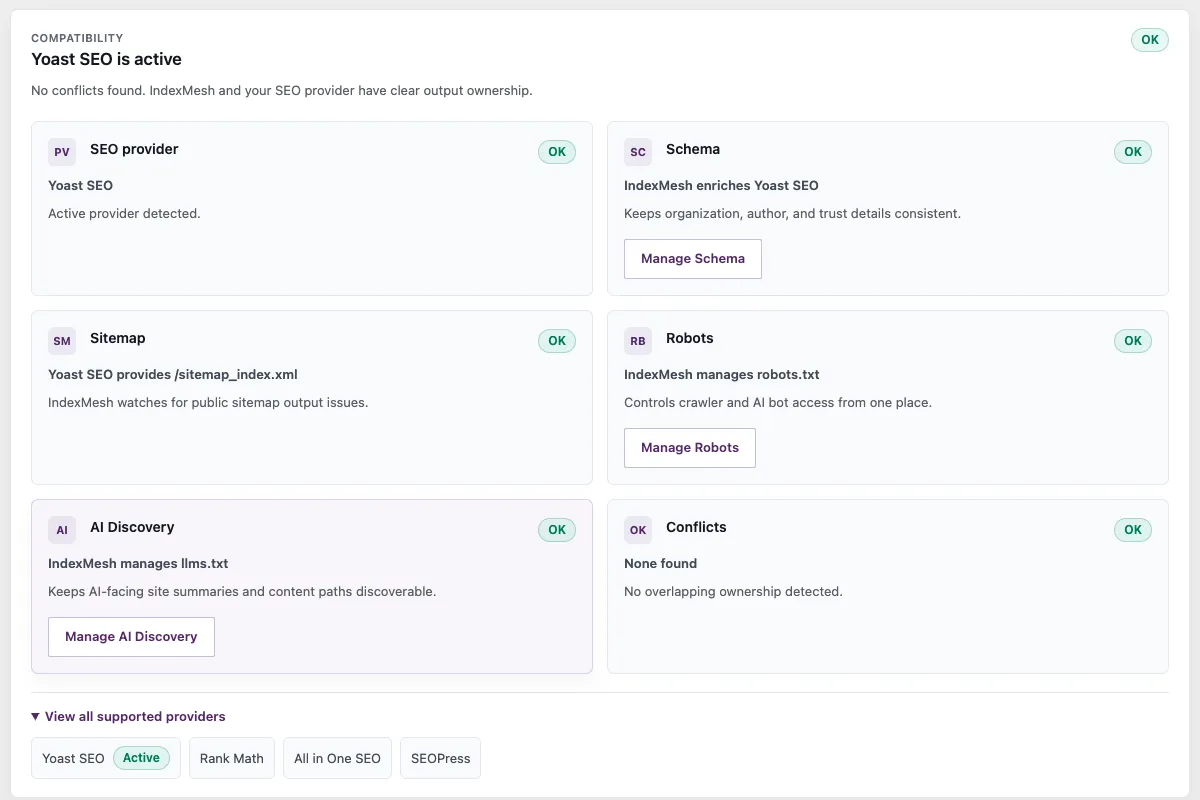
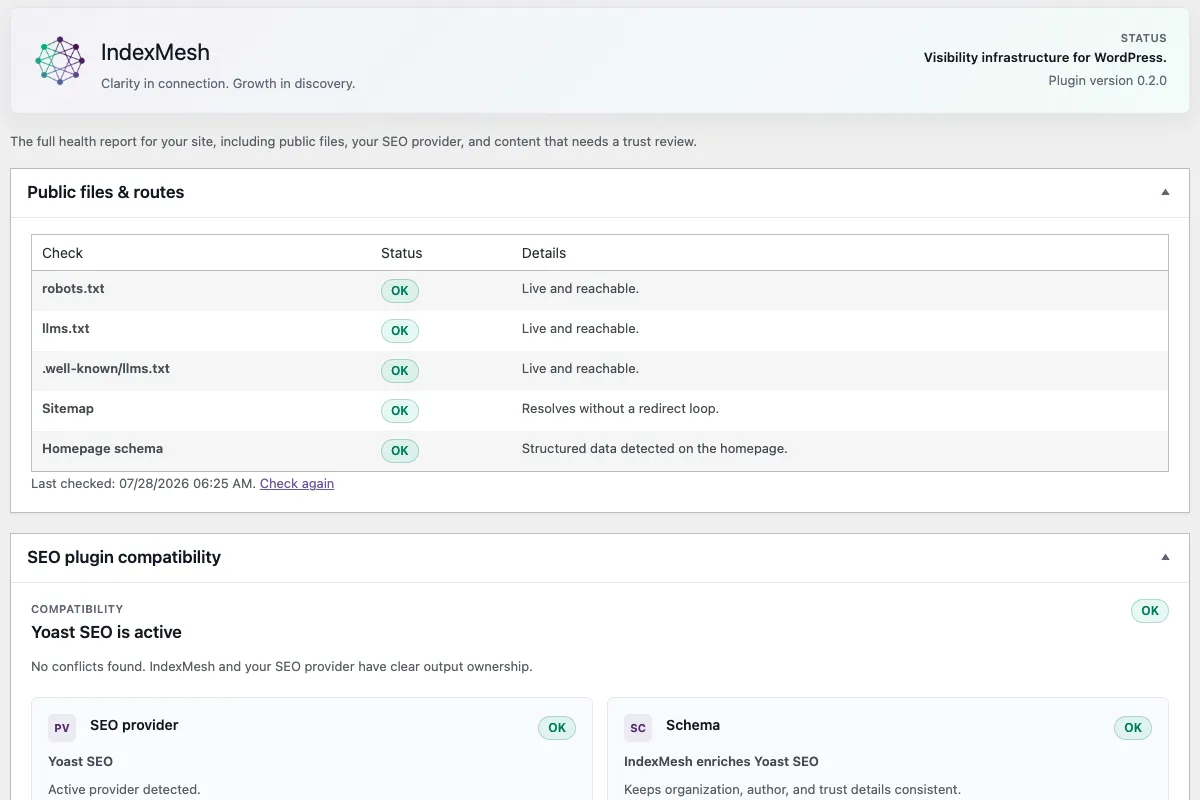
- Clear ownership. The Status and Compatibility screens show who manages schema, the sitemap, robots.txt, and llms.txt at a glance.
- Conflict detection. If a provider also generates an llms.txt file, it detects the conflict, names the owner, and defers by default.
The ownership view, on screen
Real screens from the plugin, not mockups.
AI visibility plugin compatibility, by SEO plugin
IndexMesh with Yoast SEO
IndexMesh for WordPress detects Yoast SEO (and Yoast SEO Premium), enriches the Yoast schema graph with your organisation and author details, and points to the Yoast sitemap. When Yoast’s llms.txt feature is enabled and generates a physical root file, it detects the conflict, names Yoast as the owner, and defers by default, while still serving its own .well-known copy where it can. Robots and AI crawler control stay with the plugin.
- Reads
- Detects Yoast SEO and Yoast SEO Premium, including whether Yoast is generating its own llms.txt.
- Adds
- Organization and author detail into the existing Yoast schema graph, and points to the Yoast sitemap.
- Never touches
- Never overwrites Yoast schema. Defers to Yoast’s llms.txt when Yoast’s llms.txt feature is enabled and generates a physical root file.
IndexMesh with Rank Math
The plugin detects Rank Math, enriches its schema output rather than duplicating it, and advertises the Rank Math sitemap. You manage AI crawler rules, robots.txt, and your llms.txt through it, and the Status screen confirms there are no conflicts.
- Reads
- Detects Rank Math and what it already publishes in its schema graph.
- Adds
- Organization and author detail into that graph, and advertises the correct Rank Math sitemap.
- Never touches
- Never ships a second schema graph alongside Rank Math’s.
IndexMesh with All in One SEO (AIOSEO)
The plugin detects All in One SEO, merges your details into the AIOSEO schema instead of shipping a separate graph, and advertises the correct AIOSEO sitemap URL. Robots governance and the llms.txt builder remain with it.
- Reads
- Detects All in One SEO and its existing schema output.
- Adds
- Organization and author detail merged into the AIOSEO graph, and the correct AIOSEO sitemap URL.
- Never touches
- Never publishes a competing Organization node next to AIOSEO’s.
IndexMesh with SEOPress
The plugin detects SEOPress, enriches its Organisation and Article schema in place through SEOPress’s own filters, publishes anything SEOPress can’t accept (such as author trust details) in a separate supplemental block, and advertises the correct SEOPress sitemap URL. As with the other providers, it manages robots.txt and llms.txt and shows a clean ownership view.
- Reads
- Detects SEOPress and what it already emits.
- Adds
- Organisation and Article detail merged into the SEOPress graph through its own filters, a supplemental block for anything SEOPress can’t accept, and the correct SEOPress sitemap URL.
- Never touches
- Never ships a duplicate Organisation or Article node next to SEOPress’s.
IndexMesh on plain WordPress
No SEO plugin is required. On plain WordPress, the plugin uses the WordPress core fallback and manages your schema, robots.txt, and llms.txt on its own. If you later add an SEO plugin, it detects it and switches to enriching that provider. It can also show an optional list of supported SEO plugins you may choose to install, framed as an optional upgrade, never a requirement.
- Reads
- Detects that no SEO plugin is active and uses the WordPress core fallback.
- Adds
- Manages your schema, robots.txt, and llms.txt entirely on its own.
- Never touches
- Never requires an SEO plugin. Switches to enriching one automatically if you add it later.
Known limitations and conflicts
What else can cause a problem, and how you would know.
Running more than one SEO plugin
Running two SEO plugins at once is not recommended. If the plugin detects more than one active provider, it names the one in charge and warns that the others may conflict, so you can decide which to keep. It never silently hides the second plugin.
When a provider's output has a problem
If your SEO plugin is active but a public output has a problem, for example a sitemap that redirects in a loop, the plugin flags it on the Status screen with a plain description and a fix link, instead of reporting a false all clear.
Other conflict sources
Beyond SEO plugins, the plugin's own troubleshooting documentation names cache plugins, security or firewall plugins, host-managed robots rules, custom theme code, and server-level redirects as potential conflict sources for stale or missing robots.txt and llms.txt output. If output looks stale, check for a physical file at the web root first, then purge page cache, object cache, CDN cache, and host-level cache.
For llms.txt specifically, known conflict sources beyond the four supported SEO plugins include Digitalbox and StrataWP, both of which can generate a physical llms.txt file of their own. The plugin's conflict detection for Yoast checks its configured feature option directly; detection for Rank Math and AIOSEO is a potential-owner check based on plugin activation, so confirm the live response if you run either. SEOPress PRO serves a virtual llms.txt, but this release has no named SEOPress llms.txt detector, so that specific case is not automatically caught the way Yoast, Rank Math and AIOSEO are. Confirm the live response at /llms.txt if you run SEOPress PRO.
The plugin's two daily WP-Cron events make requests only to the site's own URLs, never to a third party. If a security or firewall plugin blocks a site from making requests to itself, the Status page reports the affected check as unverified rather than failed. This is expected, and does not mean the underlying route is broken for a real visitor.
Multisite
IndexMesh for WordPress does not currently support WordPress Multisite. There is no network-wide settings screen, so it must be configured separately on each site, and a physical robots.txt or llms.txt file should not be turned on for more than one site in a subdirectory network, since every site shares the same file. Use virtual delivery mode instead on a Multisite install.
Multilingual sites (WPML, Polylang)
The plugin detects WPML and Polylang. When either is active, the current release continues serving a single, default-language llms.txt document and surfaces an in-product notice, rather than generating one per language. Full multilingual llms.txt output is a later release, not this one.
Headless WordPress
The plugin detects a headless WordPress backend and, on a staging or headless site, prompts you to turn on Site Access Protection, which can block crawlers from the backend. This is off by default and never applied without confirmation. It is a crawler-access safeguard, not a claim that the plugin integrates with, renders in, or is compatible with any specific headless frontend framework.
Common questions
Eight questions people ask about AI visibility plugin compatibility with the SEO plugin they already run.
Does IndexMesh for WordPress work with Yoast SEO?
Yes. The IndexMesh WordPress plugin detects Yoast SEO and Yoast SEO Premium, enriches the Yoast schema, and manages robots.txt and llms.txt. When Yoast's llms.txt feature is enabled and generates a physical root file, it detects the conflict and defers by default, while still serving its own .well-known copy where it can.
Does IndexMesh for WordPress work with Rank Math?
Yes. The IndexMesh WordPress plugin detects Rank Math, enriches its schema instead of duplicating it, and advertises the Rank Math sitemap.
Does IndexMesh for WordPress work with All in One SEO?
Yes. The IndexMesh WordPress plugin detects All in One SEO, merges your details into the AIOSEO schema, and advertises the correct sitemap URL.
Does IndexMesh for WordPress work with SEOPress?
Yes. The IndexMesh WordPress plugin detects SEOPress, enriches its Organisation and Article schema in place through SEOPress’s own filters, adds a supplemental block for anything SEOPress can’t accept, and advertises the correct SEOPress sitemap URL.
Will IndexMesh for WordPress overwrite my SEO plugin's schema or settings?
No. The IndexMesh WordPress plugin is read only toward providers. It enriches the provider's schema and never writes to another plugin's data.
Do I need an SEO plugin to use IndexMesh for WordPress?
No. IndexMesh for WordPress works fully on plain WordPress. An SEO plugin is an optional enhancement, not a requirement.
Can I run IndexMesh for WordPress with two SEO plugins active?
You can, but it is not recommended. The plugin will name which provider is in charge and warn that the others may conflict.
What WordPress and PHP version does IndexMesh for WordPress require?
IndexMesh for WordPress requires WordPress 6.5 or later and PHP 8.1 or later, and is tested up to WordPress 7.0, current as of version 0.2.0.
Still running something we haven't listed?
IndexMesh for WordPress works on plain WordPress with no SEO plugin at all, and it detects any of the four supported providers automatically. If you are running something else, or a configuration this page does not name, it stays out of the way rather than guessing, on the same enrichment-not-duplication principle IndexMesh's founders, Xavier Emerson and Leenat Rose, apply everywhere else in the plugin.
Open IndexMesh > Status in your admin to copy a diagnostic report, or IndexMesh > Help for setup and troubleshooting guidance. Both run on your own site and send nothing to IndexMesh or any third party.