
Stop Guessing at robots.txt with WordPress AI Crawler Controls
WordPress AI crawler controls usually arrive as a copied robots.txt block list naming nine agents, with no clue which two actually matter. IndexMesh for WordPress replaces that guesswork with a structured policy manager built for founders and small teams without a dedicated marketing or dev team.
Free, and it works alongside your existing SEO plugin.
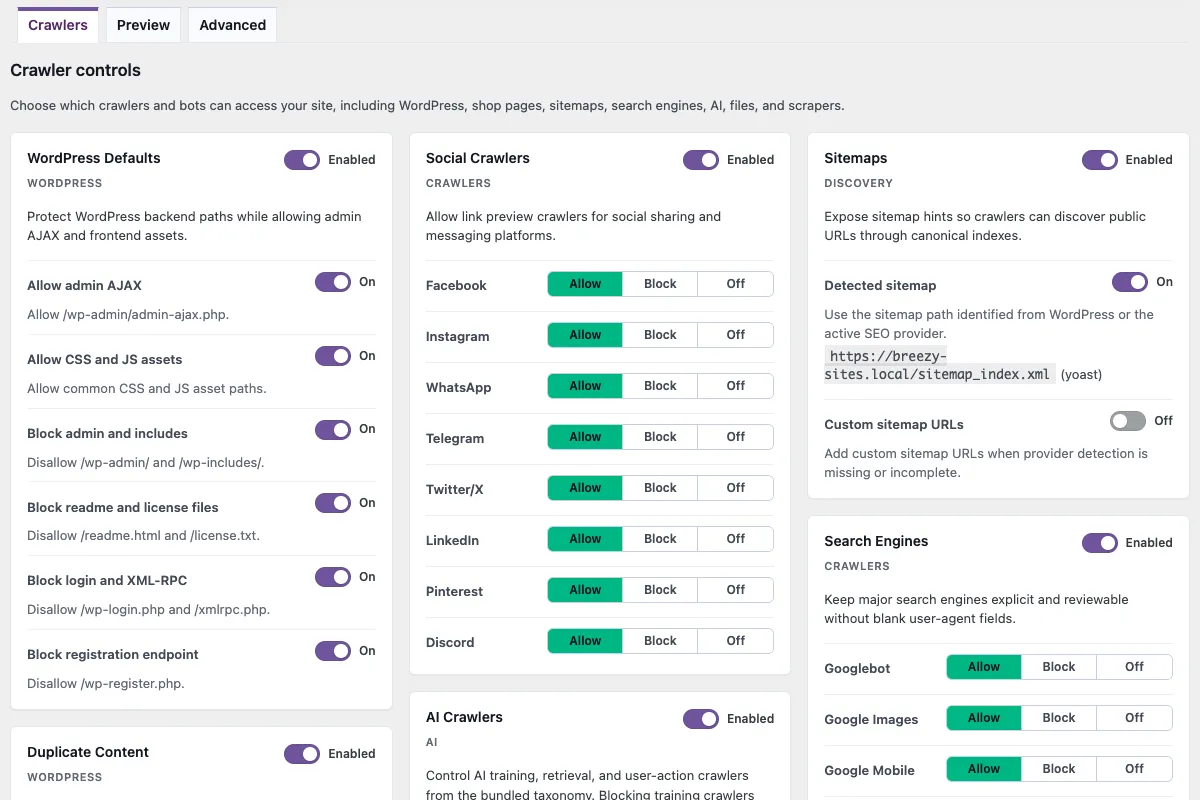
Real AI crawler controls for WordPress should do more than toggle one switch labeled "AI." IndexMesh for WordPress's crawler module replaces a plain robots.txt text field with a structured policy manager covering AI crawlers, grouped by what they do (training, search index, retrieval, and opt-out), plus bad bots, search engines, social crawlers, sitemaps, WordPress hygiene paths, and WooCommerce noise.
Set Allow, Block, or Off per group, save, check the composed output on the Preview tab, and confirm it's actually being served. IndexMesh for WordPress is a free AI visibility plugin that also keeps your organisation and author schema accurate and publishes a curated llms.txt.
Key Takeaways
- WordPress AI crawler controls, bad bots, search engines, social crawlers, sitemaps, and WordPress/WooCommerce noise all live on one screen, not a bare robots.txt text field.
- AI crawlers split into four roles, training, search index, retrieval, and opt-out, each with its own Allow/Block/Off decision instead of one blanket "AI" switch.
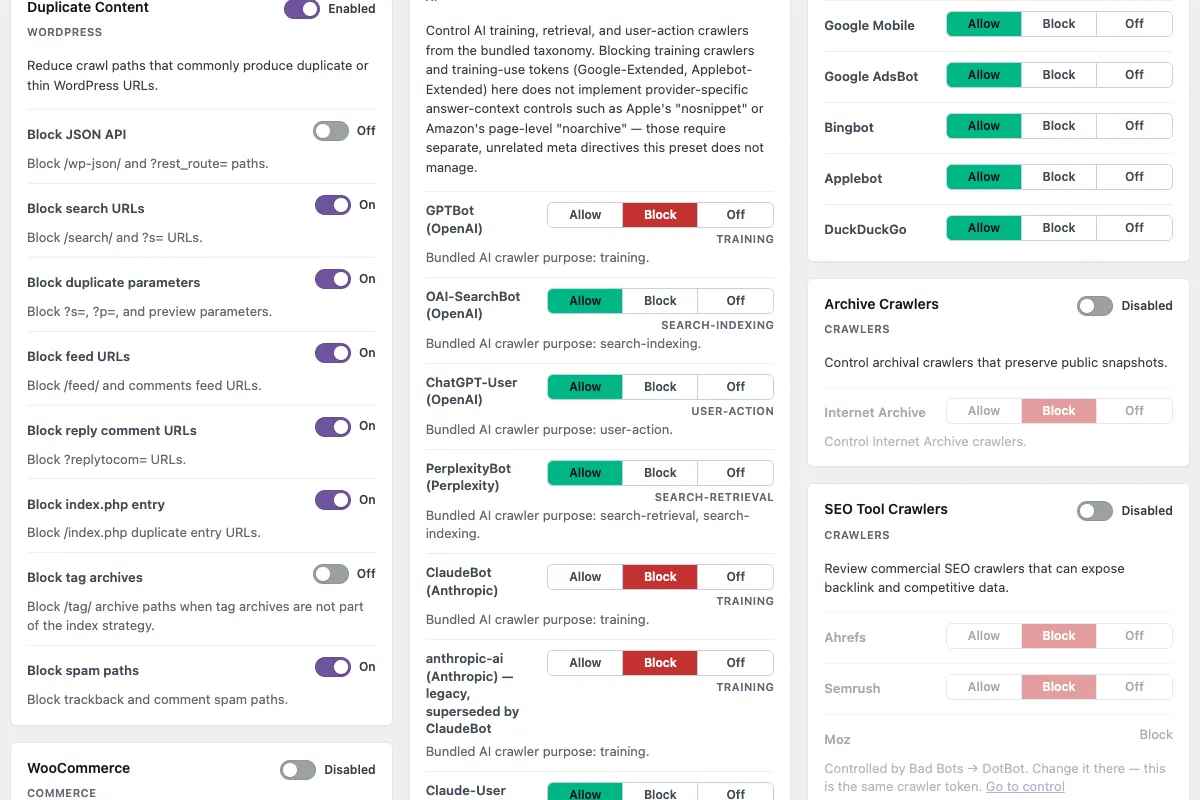
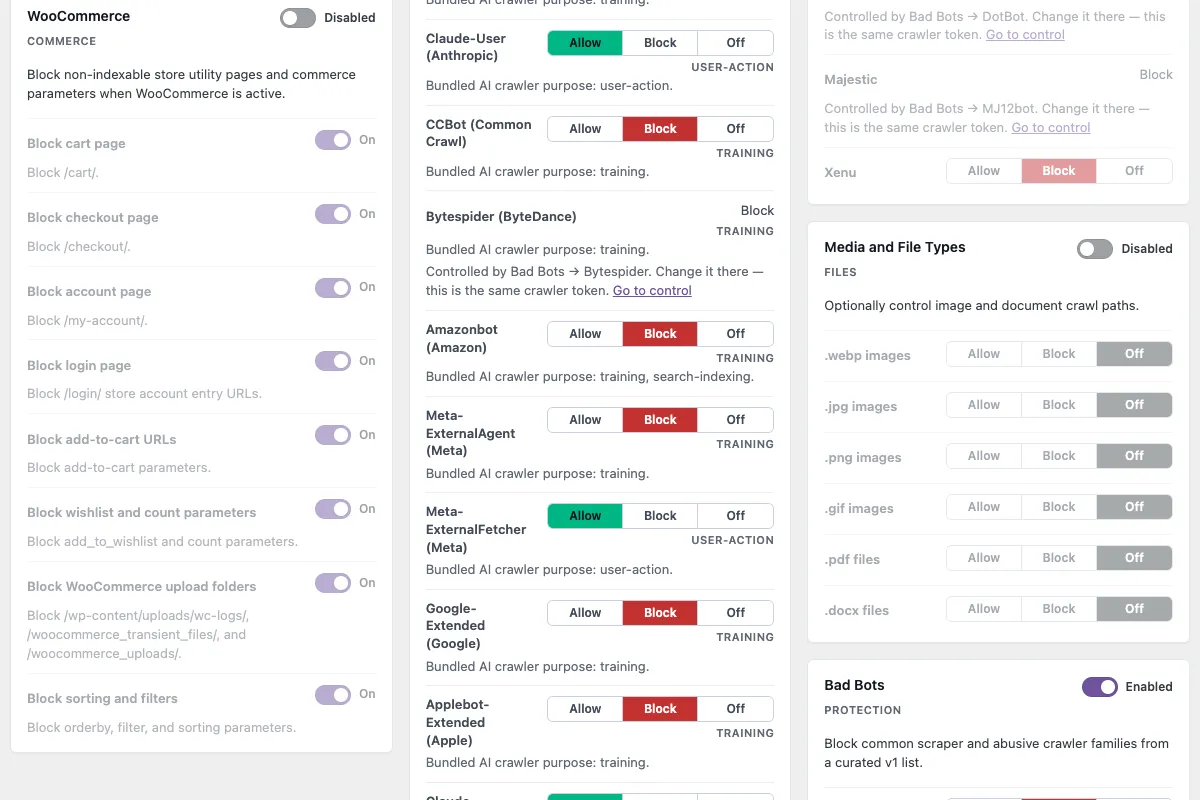
- The AI preset blocks training crawlers (GPTBot, ClaudeBot, CCBot) while allowing search and retrieval crawlers (OAI-SearchBot, Claude-User, PerplexityBot) by default.
- It detects who actually owns the robots.txt route, shows the composed output on a Preview tab after saving, and checks the live route afterward, so a saved rule and a served rule aren't assumed to be the same thing.
- Free, works alongside Yoast SEO, Rank Math, All in One SEO, or SEOPress, and sends no data anywhere but the site's own hostname.
More than an AI-only robots.txt editor
Other plugins in this category, like Better Robots.txt and Block AI Crawlers, cover overlapping ground per their own WordPress.org listings: AI crawler rules, bad bot blocking, and search-engine-crawler controls. IndexMesh for WordPress brings WordPress AI crawler controls and robots.txt governance together in one module, with AI crawlers as the lead differentiator inside a wider module that also handles social crawlers, sitemaps, WordPress hygiene paths, and WooCommerce noise.
Per-crawler AI rules
- IndexMesh for WordPress
- Free
- Better Robots.txt
- Pro/Premium-gated
- Block AI Crawlers
- Free
Existing physical robots.txt file
- IndexMesh for WordPress
- Detects ownership, offers import or keep
- Better Robots.txt
- Not specified
- Block AI Crawlers
- Can't activate at all
Overwrites or deletes files it didn't create
- IndexMesh for WordPress
- Never
- Better Robots.txt
- Not specified
- Block AI Crawlers
- Not specified
Price
- IndexMesh for WordPress
- Free, no paid tier
- Better Robots.txt
- Free / Pro / Premium
- Block AI Crawlers
- Free
Why control robots.txt and AI crawlers together instead of separately?
Blocking AI bots is not one decision, and a control surface that treats it as one is where most robots.txt files end up saying something their owner did not intend.
- A role for every crawler
- Each agent grouped by what it actually does: training, search index, retrieval, and non-crawling opt-out tokens.
- A decision per group
- Allow, Block or Off, rather than one switch labelled AI. Off means no rule is written at all, which is not the same as a rule that allows.
- The consequence beside the agent
- What a block costs, stated where the choice is made rather than in a help article you have to go and find.
- Quick policy setups, with overrides
- A preset you apply to get to a sensible starting point, and per-crawler control afterwards.
- The output after you save
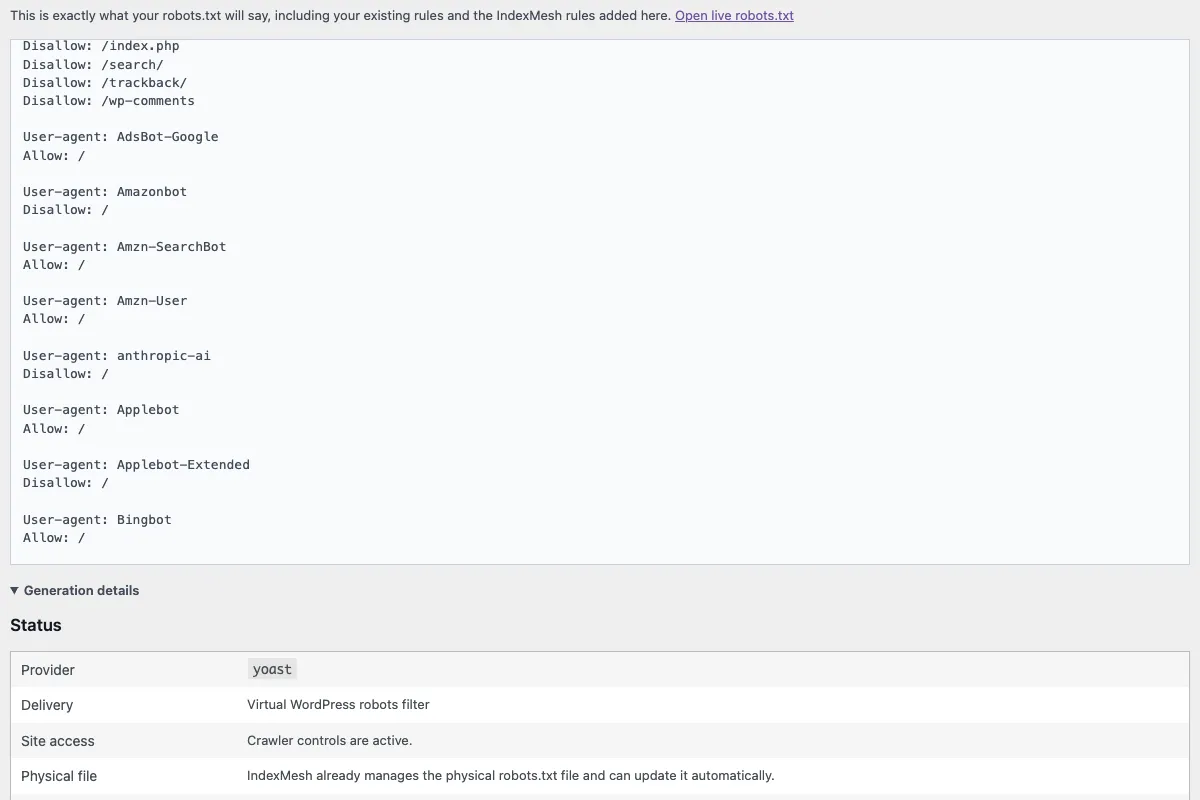
- The composed robots.txt from your saved settings, shown as it will be served, not a description of what the settings mean.
- Ownership of the route
- Whether WordPress is serving robots.txt, or a physical file at the web root is answering the route instead.
- Proof it is being served
- A check of the public route after saving. Confirming that a setting saved is a different event from confirming that a rule is live.
Those are seven separate decisions, and they stay separate here.
Does robots.txt stop a server from being overloaded by AI crawlers?
No. Robots.txt is a voluntary signal, not a lock: a request still reaches WordPress before robots.txt (or any plugin) can act on it, and a crawler that ignores the file or hides its identity gets through regardless. Stopping that requires a network or edge tool, like a CDN, WAF, or rate limiting, in front of WordPress.
WordPress can only publish and update the robots.txt file; the file itself has no power to stop a request from arriving. A crawler that ignores it, or never identifies itself in its User-Agent string, gets served the page, or hammers it, regardless of what robots.txt says.
That gap is a real, common complaint. In a widely upvoted r/sysadmin thread (804 upvotes, 2024), a web hosting sysadmin described exactly this: aggressive AI crawlers "ignore robots.txt altogether," overload shared servers with request floods, and are hard to identify because "some of the small ones doesn't even identify themselves in the User-Agent header." The top reply put it plainly: bots that scan aggressively enough "cause serious performance issues for legitimate users," and the only real fix was blocking them upstream, not editing a text file. Site owners running WordPress on shared or modest hosting, exactly the founders and small teams this plugin is built for, are the ones who feel this first. The scale is real too: Trusted Reviews went offline in August 2025 after AI bots scraped it 1.6 million times in a single day, and separately, Wikimedia's multimedia bandwidth usage rose 50% since January 2024 from AI-training crawler traffic alone.
IndexMesh for WordPress governs the policy layer: what your site declares it wants, cleanly, per crawler, with proof the declaration is actually being served. It runs inside WordPress, which means it can only act once a request has already arrived. Stopping a flood before it reaches the server, or blocking a bot that ignores robots.txt entirely, is a network or edge job: a CDN or WAF, server-level rate limiting, or tools like fail2ban. The two layers aren't competing; a clear, accurate robots.txt policy is still worth having for the crawlers that do cooperate, but it isn't the layer that protects a server from ones that don't.
What can you manage with WordPress AI crawler controls?
Each core area below is a control that ships, an operator situation it exists for, and the shipped behaviour that proves the claim.
Crawler role and identity
- What you manage
- Which of four tiers an agent sits in: training, search index, retrieval, or opt-out token
- Example use case
- A copied block list names nine agents; nothing on screen shows which two actually matter
- Practical advantage
- You act on a role rather than on a string you have to recognise
- IndexMesh proof
- A bundled bot taxonomy with four tiers, read from plugin files and working offline
Allow, Block or Off
- What you manage
- An explicit decision per group, with individual overrides underneath it
- Example use case
- You want training blocked and nothing else touched
- Practical advantage
- Three states, so "no rule" stays distinguishable from "a rule that allows"
- IndexMesh proof
- Preset groups plus individual Allow, Block and Off controls
Training versus discovery and retrieval
- What you manage
- The consequence of a block, stated beside the agent it applies to
- Example use case
- A publisher wants AI search visibility without permitting training
- Practical advantage
- A training-only decision does not block discovery as a side effect
- IndexMesh proof
- training entries default to Block in the AI preset; other tiers default to Allow
Quick policy setups and overrides
- What you manage
- A preset applied first, then any single crawler changed afterwards
- Example use case
- Configure a new site quickly, then revisit one agent when the business changes
- Practical advantage
- A starting point that is not a ceiling
- IndexMesh proof
- Preset groups render before append-only custom directives, in a deterministic order
Physical and virtual ownership
- What you manage
- Whether WordPress composes robots.txt through its filter, or a physical file is served instead
- Example use case
- Saved rules never took effect, because a root file was already answering the route
- Practical advantage
- You learn which thing owns the route before writing a rule into the wrong one
- IndexMesh proof
- Physical-file detection, five reported export states, and a write refusal outside managed-file mode
Preview and served-output checks
- What you manage
- The composed output after saving, and a check of the public route
- Example use case
- The admin preview shows one policy while /robots.txt serves another
- Practical advantage
- Saving a rule and serving a rule stop being the same claim
- IndexMesh proof
- A composed preview of the managed block, plus a same-site health check of robots.txt
Existing rules and import
- What you manage
- An existing robots.txt read into preset groups, with anything unrecognised kept
- Example use case
- Another plugin or a past developer wrote the file, and nothing in it should be lost
- Practical advantage
- Nothing you already have has to be discarded to adopt a different control model
- IndexMesh proof
- Reads the physical file and served output only; keeps unmatched lines as Advanced directives, status pending, imported or skipped
Advisory Content Signals
- What you manage
- search, ai-input and ai-train values attached to a user-agent group
- Example use case
- You allow crawling but want to state a preference about training use
- Practical advantage
- "Do not crawl" and "crawl, but note our use preference" stop being one control
- IndexMesh proof
- First-class Content-Signal directives rendered deterministically after each user-agent group. Advisory only
Which crawler belongs in which tier, what each operator documents, and what a block actually costs are the subject of the pillar: read the full guide to AI crawlers.
A blanket "block all AI bots" rule is the single most common mistake made here: see AI crawler blocking mistakes for what it actually costs.
What do Content Signals add to a robots policy?
Access rules say who may fetch a page, and Content Signals state a preference about what may be done with it afterwards.
| Signal | What it covers |
|---|---|
search | Using the page to build a search index |
ai-input | Using the page to build an answer at the moment someone asks |
ai-train | Using the page to train a model |
Content Signals are advisory crawler hints. Setting one to no states a preference and does not stop a request arriving.
Cloudflare’s Browser Run crawl endpoint honours them, but no other major crawler is documented as honouring them as a standalone directive.
How do you know the rule is actually being served?
The module reports one of five export states, and the state tells you what it does and does not control.
| State | What it means |
|---|---|
disabled | Managed-file export is off |
virtual-only | The IndexMesh WordPress plugin serves through the WordPress filter only, and manages no physical file |
blocked-by-existing-file | A physical robots.txt exists that the IndexMesh WordPress plugin did not create. It needs an import or keep decision from you |
ready | Managed-file mode is on and no file exists yet |
file-synced | IndexMesh for WordPress owns the physical file and keeps it in step with saved settings |
Export refuses to write while the mode is not managed-file, and IndexMesh for WordPress never deletes a physical robots.txt, including on mode change, module disable and plugin deactivation. Turning managed-file mode off leaves the current file in place for you to remove yourself. Setup, state by state, is in the documentation: configure it.
Site Access Protection for staging sites
Site Access Protection for staging sites covers staging, local, and headless environments. It's off by default and blocks crawlers only after you turn it on. The plugin never writes Disallow: / on its own because it detected a non-production environment.
A tool that decides a site should be invisible, and is wrong, costs more than one you have to switch on yourself.
What the controls actually look like
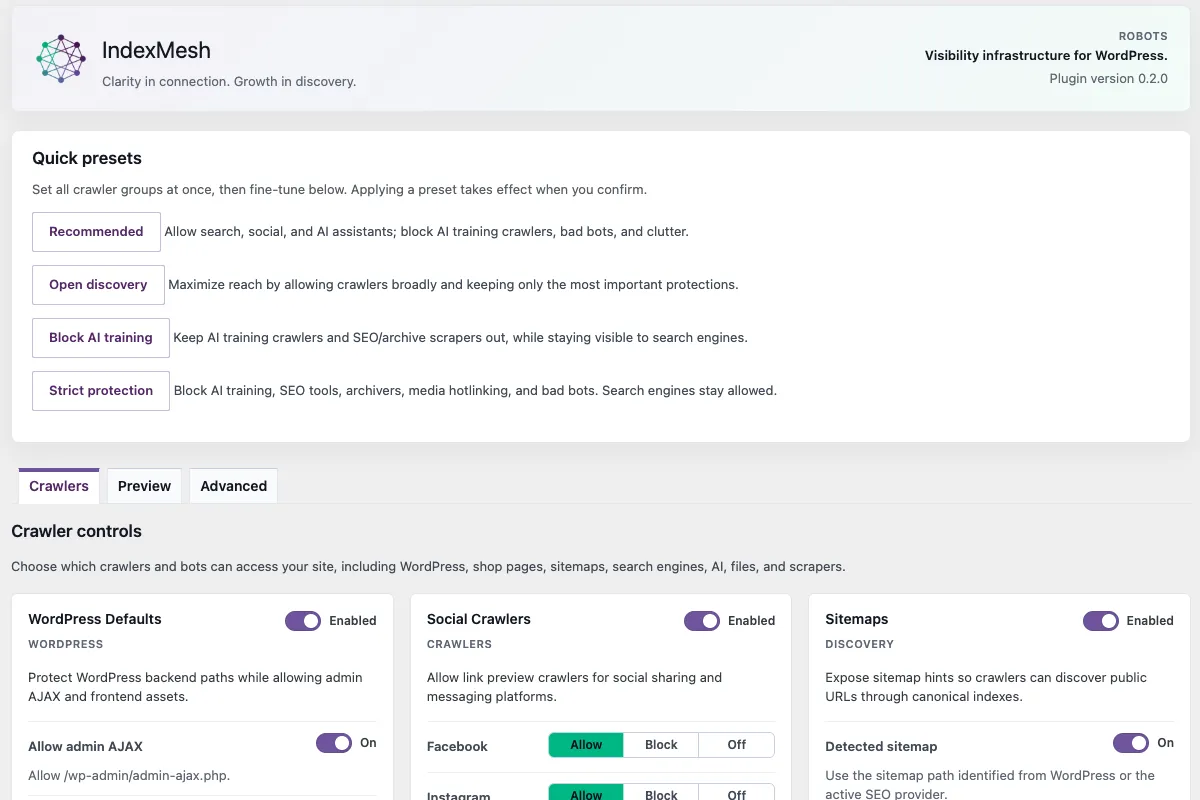
Two screens carry most of this module: the presets, and the per-crawler list underneath them.
Working alongside Yoast SEO, Rank Math, All in One SEO, and SEOPress
Every setup below already touches robots.txt, and none of them is replaced by anything on this page.
Keep the SEO platform you already trust. IndexMesh is not another one: it is an AI-discovery governance layer that sits around it.
Yoast SEO
- What it already provides
- Creating or editing a physical robots.txt as raw text where the server permits file editing, and a pointer to edit or upload the file at server level where it does not
- How IndexMesh differs
- Quick policy setups, crawlers grouped by role, an Allow, Block or Off decision per group with the consequence stated beside the agent, the composed output previewed after saving, and a check that the rule is being served
- How they coexist
- The plugin appends its managed block after existing output through the robots_txt filter. It does not replace what another provider emits, and it does not delete a physical file it did not create
Rank Math
- What it already provides
- Robots controls inside its own settings
- How IndexMesh differs
- The same structured policy model, plus physical and virtual ownership detection and an import path for rules that already exist
- How they coexist
- Existing rules are read from the served output and the physical file only. The plugin never reads Rank Math's private settings tables
All in One SEO
- What it already provides
- Robots controls inside its own settings
- How IndexMesh differs
- As above
- How they coexist
- As above. Read from served output only, never from provider settings tables
SEOPress
- What it already provides
- Robots controls inside its own settings
- How IndexMesh differs
- As above
- How they coexist
- As above. Read from served output only, never from provider settings tables
Plain WordPress
- What it already provides
- A virtual robots.txt with very little in it and no crawler-level controls
- How IndexMesh differs
- The whole module, with no SEO plugin required
- How they coexist
- Nothing to reconcile. The plugin composes the virtual output itself
One is a text editor. The other is a policy manager.
Yoast gives an experienced operator a file editor, and for someone who knows every token by heart that is genuinely enough. The difference here is the control model, not the length of a feature list.
Provider behaviour and the evidence behind it live on the compatibility page.
What the AI crawler control module of IndexMesh for WordPress doesn't do
Each of these is a deliberate boundary rather than an unfinished feature, and each one is worth knowing before you rely on the module.
- It does not block anything on its own Staging, local and headless states raise a prompt so you decide. IndexMesh for WordPress does not emit Disallow: / automatically and adds no blanket production block by default.
- It does not read another plugin's settings Rules that already exist are imported from the served output and the physical file only, never from a provider's private tables.
- It does not delete a file it did not create A non-IndexMesh physical robots.txt needs your explicit confirmation before it is imported or replaced, and it survives mode changes, module disable and deactivation.
- It does not cover every crawler The bundled taxonomy is curated rather than exhaustive. A token appearing in a public reference is not automatically safe to add to a runtime policy list.
- It cannot see your CDN or firewall Host, CDN and firewall rules apply before robots.txt is read, and WordPress cannot always identify them, so that check stays external.
- Content Signals are advisory No legal enforceability is claimed for them. RSL License: emission is deferred to v1.1.
- Opt-out tokens are not visitors Google-Extended and Applebot-Extended can be set in policy and have no user-agent match patterns, so nothing matching them ever arrives to be counted.
- Some Apple controls are outside this release Applebot sits in the general Search Engines preset rather than the AI-bot taxonomy. iTMS is not a controllable item, because Apple documents that it does not follow robots.txt. The Apple-specific nosnippet, X-Robots-Tag and isAccessibleForFree controls are not public features here.
- Local signals are not analytics Citation visibility exposes read-only user-agent matches from the bundled taxonomy, locally. It is not a verified citation, not a ranking and not a score.
Does the plugin send my site's data anywhere?
No. By design, the IndexMesh WordPress plugin does not send data to IndexMesh, or to any third party. The bot taxonomy is bundled and matched locally. Provider detection is local. Robots governance, llms.txt, discovery routing, conflict detection and schema generation make no network requests at all. The plugin makes exactly two kinds of outbound request, and both go to your own hostname: fetching a post's own rendered page to validate the schema on it, and requesting your public routes to check they respond.
IndexMesh > Status runs those checks, caching results for fifteen minutes with a recheck action to force a fresh run, and produces a plain-text support report you copy yourself. Nothing is sent anywhere automatically.
IndexMesh for WordPress was built by IndexMesh, the brand visibility platform founded by Xavier Emerson and Leenat Rose. It's free and available now on WordPress.org, alongside the rest of the WordPress plugin feature set. Current release is version 0.2.0, tested on WordPress 6.5 through 7.0, and PHP 8.1 and later.
Already running a single-purpose crawler plugin like Block AI Crawlers? See what switching to this module adds.
WordPress AI Crawler Controls FAQ
Does blocking AI training crawlers affect Google rankings?
No. Google's own search crawler, Googlebot, is separate from AI training crawlers like GPTBot or Google-Extended. Blocking a training crawler through this plugin doesn't touch Googlebot's access or your existing search rankings.
Can I block AI training bots while still allowing AI search crawlers to cite me?
Yes. That's the default behaviour of the AI preset: training-tier crawlers (GPTBot, ClaudeBot, CCBot) default to Block, while search index and retrieval crawlers (OAI-SearchBot, Claude-User, PerplexityBot) default to Allow, so a training block doesn't remove you from AI-answer citations.
Will this plugin conflict with Yoast, Rank Math, All in One SEO, or SEOPress?
No. It appends its managed block after existing output through the robots_txt filter, or reads served output and the physical file for import. It never reads another plugin's private settings tables and never deletes a physical robots.txt it didn't create.
What happens on a staging or local WordPress install?
Nothing, until you turn it on. Site Access Protection is off by default and only raises a prompt for staging, local, and headless environments. The plugin never writes a blanket disallow rule automatically.
What are the four quick-start presets?
Recommended (block AI training and bad bots; allow search, social, and AI assistants), Open Discovery (maximise reach), Block AI Training (block training crawlers, stay visible to search engines), and Strict Protection (block AI training, SEO tools, and bad bots). Each takes effect only after you confirm it.
What happens if a physical robots.txt file already exists on my site?
The plugin reports a blocked-by-existing-file state and asks you to import or keep it rather than overwriting it silently. It never deletes a physical robots.txt it didn't create, including on mode change, module disable, or plugin deactivation.
Will this plugin improve my rankings or get me cited by AI?
No, and be skeptical of anyone promising that. This plugin publishes accurate signals, crawler policy, schema, and a curated llms.txt for search engines and AI systems to work with. What those systems do with them, including ranking or citing a page, is their decision, not the plugin's.
Is it safe to let this plugin manage my robots.txt and llms.txt files?
Yes. It only takes over a route after you confirm, backs up whatever it replaces, and never deletes a physical file it didn't create, including on mode change, module disable, or plugin deactivation. If it can't determine who owns a route, it defers rather than guessing.
Setting AI crawler controls in WordPress without editing the file by hand
The distinctions that decide this are easy to get wrong in a text field, and expensive when you do.
IndexMesh for WordPress groups the crawlers in its bundled taxonomy by what they actually do, states the consequence beside each one, shows the exact robots.txt output on its Preview tab after you save, and then checks that the file is really being served.
Free, and it works alongside your existing SEO plugin.